
Send data to your system (webhooks)
Every event ClearTalk can send to your endpoint, what each payload contains, and how deliveries are signed.
ClearTalk can POST JSON to any HTTPS endpoint you configure — after calls, chat sessions, and key texting moments. This page is the full reference: where to set it up, every event, the payload fields, and the delivery mechanics.
Configuration
Everything lives under Integrations → Send data to your system in your dashboard (owner or admin role required):
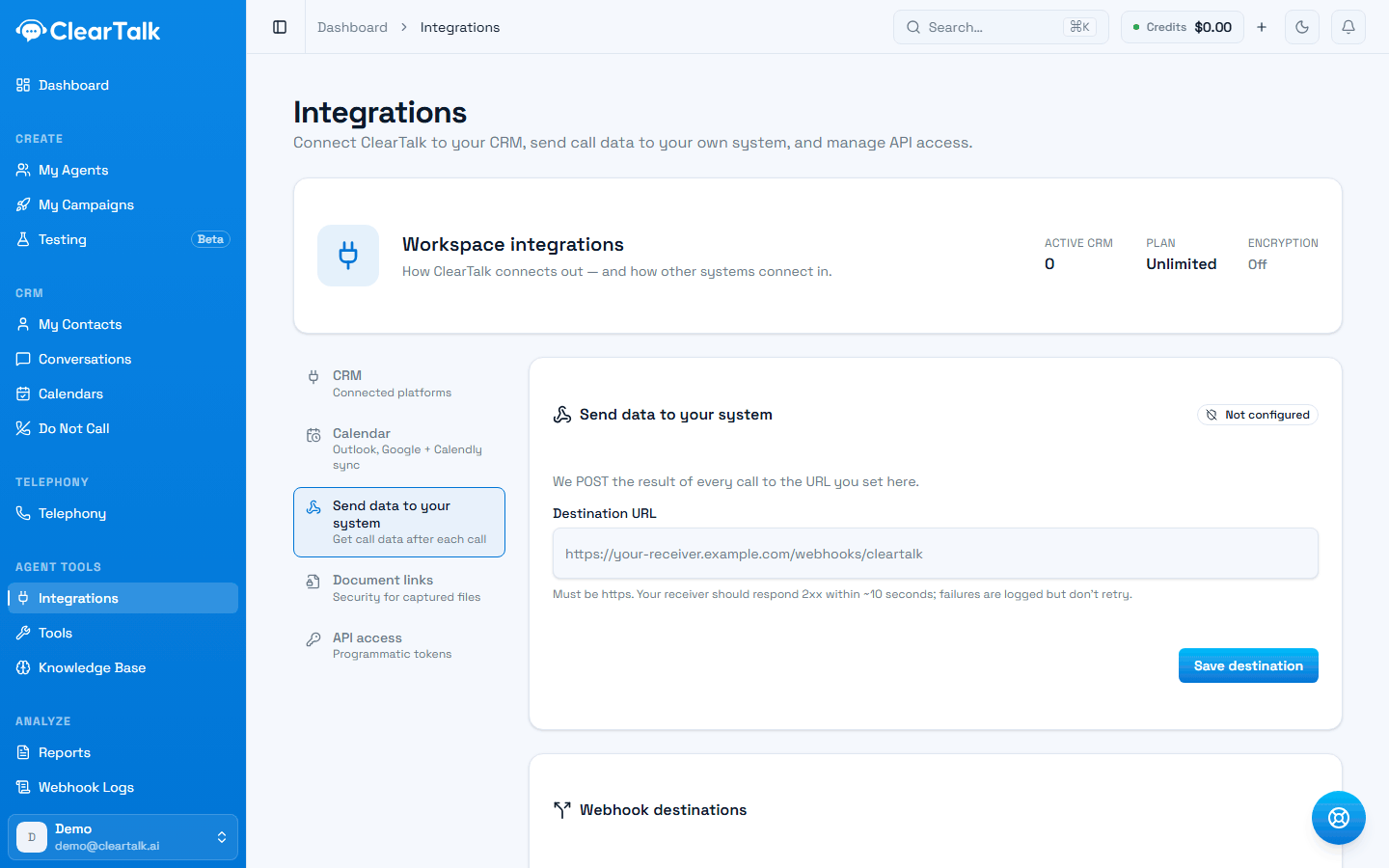
- 1Where this lives. The other tabs are CRM sign-in, calendars, document links, and API keys.
- 2Whether anything is configured at all — check this before debugging a missing delivery.
- 3Must be https, and your receiver has about ten seconds to answer.
- Destination URL — the simple option: one HTTPS endpoint that receives everything.
- Webhook destinations — the flexible option: multiple endpoints, each with a label, its own event subscriptions, and optionally scoped to a single campaign (useful for routing each client's traffic to their own system). An empty event selection means all events, including future ones.
Destinations override the single URL
The moment any destination rows exist, the single Destination URL is ignored entirely. Configure one approach or the other — and note that if destinations exist but none subscribes to an event, that event is delivered nowhere.
You can also filter which call results forward at all (Outcome filters), and browse every delivery — status, payload, response — under Webhook Logs in the sidebar, which includes a manual resend.
SMS agents can carry their own webhook
A texting agent with a Webhook URL set in its SMS Settings takes over the conversation events for its own threads: sms.conversation.replied, sms.conversation.closed, and sms.conversation.opted_out go to the agent's URL instead of the destinations above. The agent's Notify me when setting decides what it receives — Every message sends each reply plus the close, The conversation ends sends only the close. Sequence and appointment events always follow the org-wide routing, and agents without a URL do too.
Events
| Event | Fires when |
|---|---|
call.completed | A phone call or web-agent session ends and is processed. |
chat.completed | A chatbot session settles (only if the visitor sent at least one message). |
sms.conversation.replied | A lead's first reply in a texting conversation — the real-time "this lead engaged" signal. |
sms.conversation.closed | A texting conversation is closed. |
sms.conversation.opted_out | A conversation closed because the lead opted out — same payload as closed, different event name, so you can key suppression syncs off it. |
sms.cadence.completed | A scripted message sequence finished without a reply. |
sms.appointment.booked | A texting conversation booked an appointment. |
Identifying call payloads
Call payloads carry no top-level event field — identify them by the presence of cleartalk.externalCallId. All SMS and chat payloads carry an explicit event field.
The call.completed payload
The call payload passes through what the voice layer reports, minus internal fields, plus three blocks ClearTalk adds. The fields your receiver will use most:
| Field | What it is |
|---|---|
call_id | The call's ID (also in cleartalk.externalCallId). |
inbound | true for inbound calls. On outbound calls to is the customer; on inbound calls from is. |
to, from | The two phone numbers, E.164 format. |
status, completed, answered_by | Call status; answered_by distinguishes human / voicemail / no-answer. |
duration | Call length in seconds. |
recording_url | Link to the call audio. |
transcripts | Turn-by-turn transcript array; concatenated_transcript is the same as one string. |
summary | A short summary of the call. |
started_at, ended_at | Timestamps. |
cleartalk | ClearTalk's stable identifiers: organizationId, agentId, agentName, campaignId, contactId, externalCallId, direction. The anchor for matching records in your system. |
cost | Your cost for the call, at your account's rates. |
ai_analysis | Present when AI analysis ran: call_outcome (the call's result), call_notes (AI summary), appointment_date_time (when one was booked), and analysis_schema (answers to your configured post-call questions, keyed by the exact question text). |
The SMS and chat payloads
All carry event plus a cleartalk identifier block (organizationId, conversationId, agentId, campaignId, contactId, contactPhone, and related IDs), then an event-specific block:
sms.conversation.replied—sms.repliedAtandsms.message(the reply's body and time).sms.conversation.closed/opted_out—sms.status, timestamps,messageCount,cost, andhistory: the full message list (direction, body, status, time; up to 200 messages, oldest first).sms.cadence.completed—cadence.disposition(completedorhanded_off),touchesSent, enrollment timestamps.sms.appointment.booked—appointment:bookingId,calendarSource,startAt,endAt,attendeeName,attendeeEmail.chat.completed—chat:status,messageCount,cost, timestamps, and the messagehistory.
How a delivery travels
- 1
The conversation ends
ClearTalk finishes processing it — transcript, summary, and result are ready.
- 2
The payload is assembled
Internal fields are stripped out and ClearTalk's own identifiers are added, so you can match the record to a contact and campaign.
- 3
It's signed and sent
A signature and timestamp go in the headers, then it's posted to your address.
- 4
Your endpoint replies
Answer with any 2xx within 30 seconds and the delivery is done.
- 5
Either way, it's logged
Every attempt appears under Webhook Logs with its status and payload — and can be resent by hand from there.
A rejected delivery is not retried
If your endpoint answers with an error status, ClearTalk records it and moves on — from its side the delivery happened. Only network failures and timeouts are retried automatically. Check Webhook Logs if something looks missing.
Delivery mechanics
- Method:
POST,content-type: application/json, to your HTTPS endpoint. Respond with any 2xx within 30 seconds. - Signing: every delivery carries
x-cleartalk-timestamp(unix seconds) andx-cleartalk-signature: sha256=<hex>, where the hex is HMAC-SHA256 of"{timestamp}.{raw body}"using your signing secret (shown aswhsec_...in the destinations card — one secret per organization, shared by all destinations). Verify by recomputing over the raw bytes you received. Test sends addx-cleartalk-test: 1; manual resends addx-cleartalk-retry-of. - Retries: a response with a non-2xx status is logged but not retried — from ClearTalk's side the delivery happened. Network failures and timeouts on call and SMS events are retried a few times automatically; chat completions are not. Anything can be resent manually from Webhook Logs.
- Test sends: the Send test data button posts a synthetic payload (
event: "cleartalk.webhook.test"). Its field names intentionally don't match a real call payload — build field mappings in your receiving system from a real call, not the test.
When payload encryption is on
Organizations with HIPAA-grade payload encryption enabled (Security page) send every payload as an encrypted envelope instead of plaintext JSON:
{ "encrypted_data": "<base64>", "IV": "<base64>" }AES-256-CBC with your organization's key; decrypting yields exactly the JSON documented above. The signature is computed over the envelope, so verify-then-decrypt works. Note that no-code receivers (GoHighLevel, Zapier) can't decrypt — encryption is for customers running their own receiving endpoint.