
Getting approved to text
US texting requires business verification and A2P registration before anything sends. Here's the process, start to finish.
In the United States, business texting runs through a framework called A2P 10DLC (application-to-person messaging on ten-digit long codes). Registration is mandatory — unregistered traffic is filtered or blocked outright by carriers — and approval takes days, not minutes.
Start registration on day one of a texting project, not the week you want to launch. It's the only step with a waiting period you cannot compress.
Everything below happens in your dashboard under Telephony → Compliance. This is what it looks like when all three stages are done:
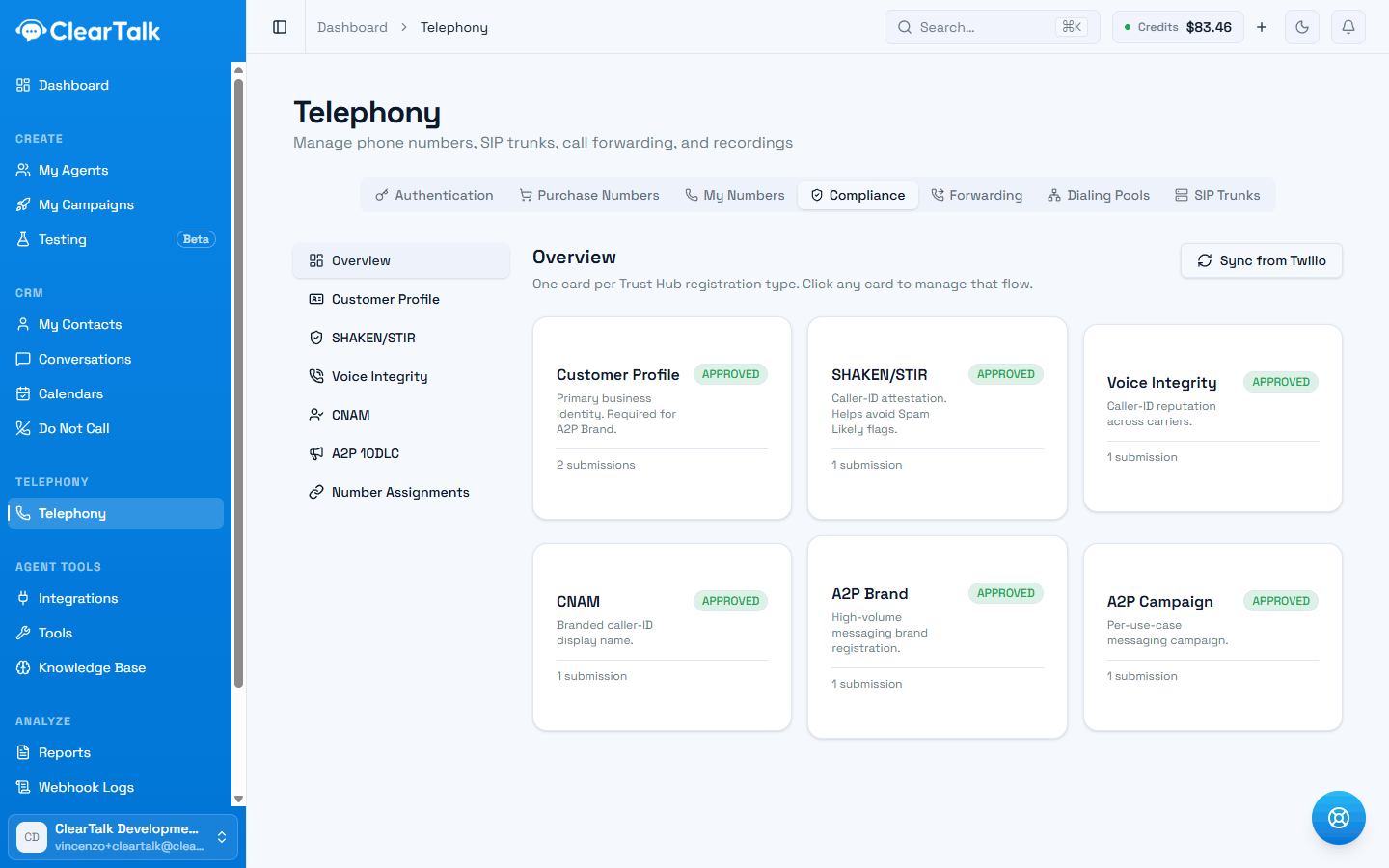
- 1A2P Brand — who is sending. Usually approves the same day once the profile is verified.
- 2A2P Campaign — what you send. This is the one carriers read properly, and the one that gets sent back.
Registration needs your own carrier account
These screens only appear on plans with bring-your-own-carrier. Numbers on ClearTalk's managed account can't be registered for messaging, which means they can't send texts at all — see managed numbers or your own carrier account.
Set expectations early
The full sequence typically takes several business days end to end, and each stage can be sent back for corrections. Nothing about your texting campaigns can send until it's done.
Customer Profile — verify your business1–3 business days
Your legal business identity. Also the prerequisite for the voice registrations, so it pays off twice.
Brand — register who is sendingoften same day
Usually quick once the profile is approved. Your brand's trust level governs how much you can send per day.
Campaign — register what you send1–3 business days
Carriers read the three opt-in, opt-out and help messages you write, and compare your live traffic against them.
Ready to send—
Numbers are attached to the campaign automatically, including ones you buy later.
The three stages
Customer Profile — verify your business
A one-time verification of your legal business identity: legal name, address, business type, and registration number (EIN in the US). This profile is also the prerequisite for the voice registrations (CNAM, SHAKEN/STIR), so it pays off across both channels. Use your exact legal details — mismatches with government records are the most common rejection reason.
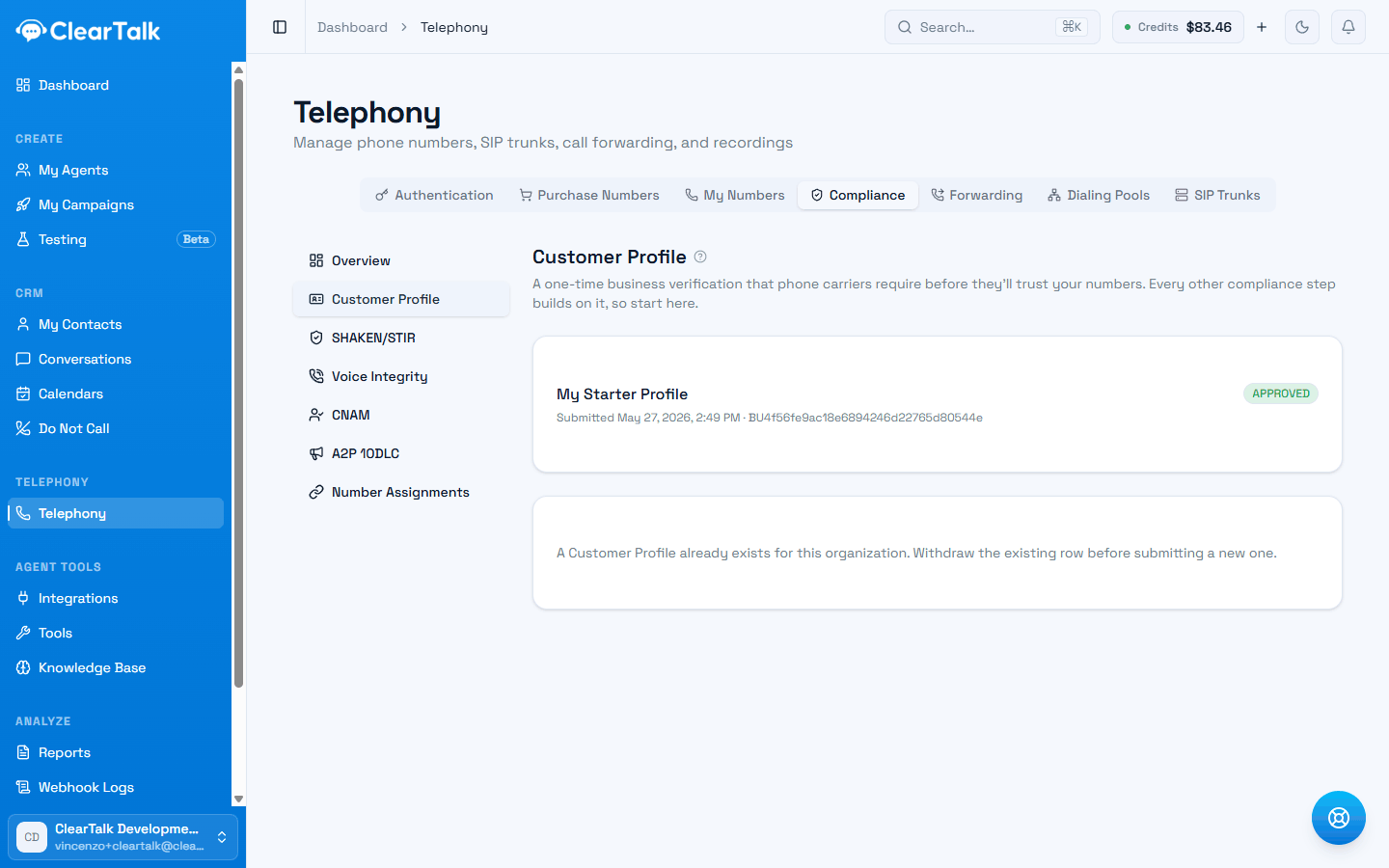
- 1Approved. The submission date and its carrier reference are all you get back — the details you entered aren't shown again.
- 2One profile per organization. Correcting a mistake means withdrawing this one first, which restarts the wait.
Brand — register who is sending
Your verified business is registered as a messaging Brand with the carrier ecosystem. The Brand's trust level influences your daily message throughput — a verified, complete registration sends faster and more per day than a minimal one.
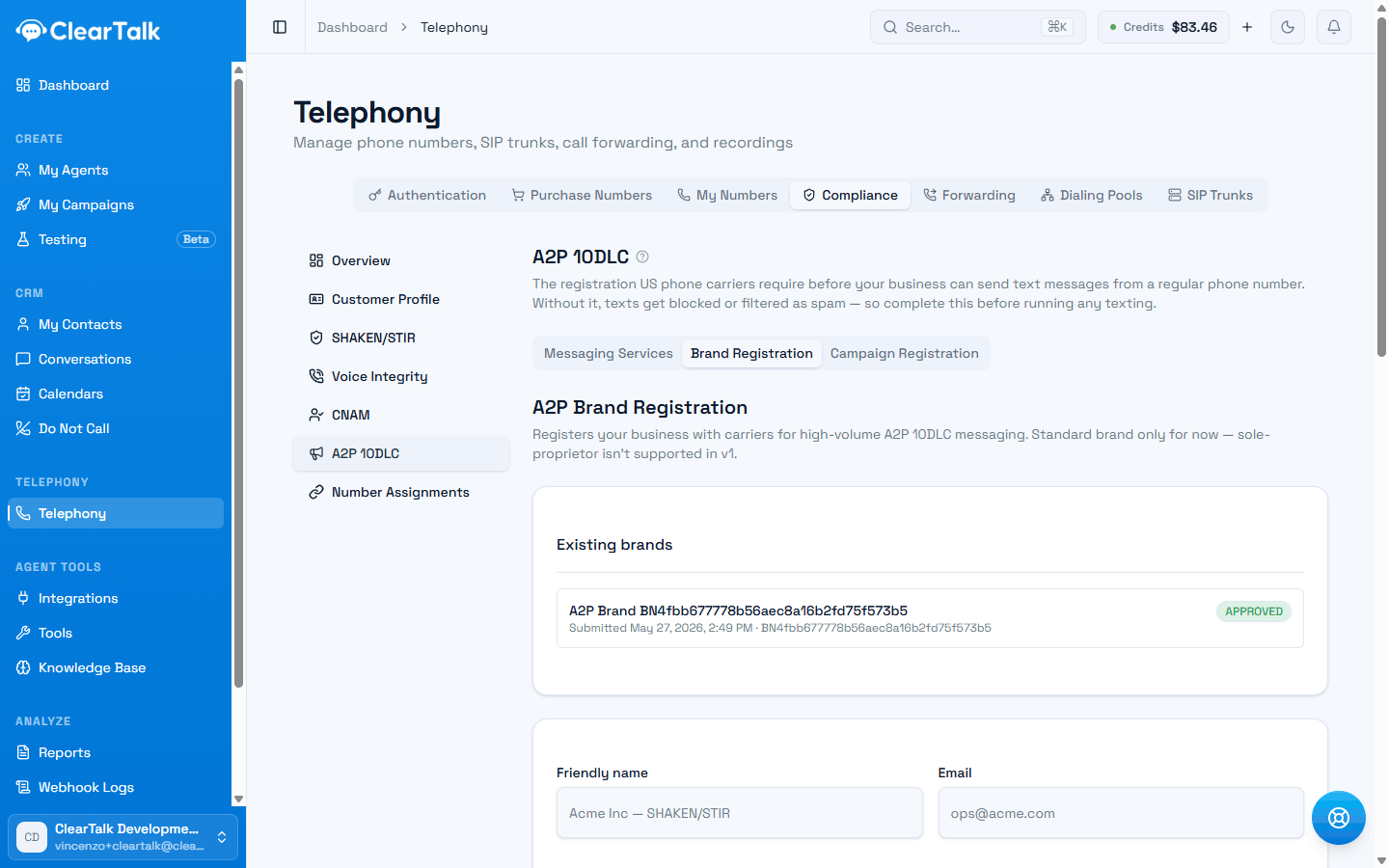
- 1Three tabs, done left to right. Messaging Services first, then this, then Campaign.
- 2Approved. Trust level isn't shown here — it's set by how complete your business verification was.
Campaign — register what you send
You give the campaign a name, then write three messages: what someone receives when they opt in, what they receive when they opt out, and what they get if they text HELP. Those three are what carriers review — they're submitted as your sample messages, so they are the only writing in this process that gets read. Keyword lists come pre-filled with the standard ones and are worth leaving alone unless you have a reason.
Once approved, your phone numbers are attached to the registered campaign through a Messaging Service — ClearTalk handles the number assignments for you, and newly purchased numbers are attached automatically.
You don't pick a use case
Other platforms ask you to choose one (marketing, customer care, delivery notifications). ClearTalk registers every campaign as marketing, which is the broadest category and the one carriers scrutinise hardest. It also registers your campaign as containing no links and no phone numbers. If your texts will include either, that's a mismatch between what you registered and what you send — the thing carriers filter for. Raise it with support before launching that kind of campaign.
Until your Brand is approved, this tab won't let you start:
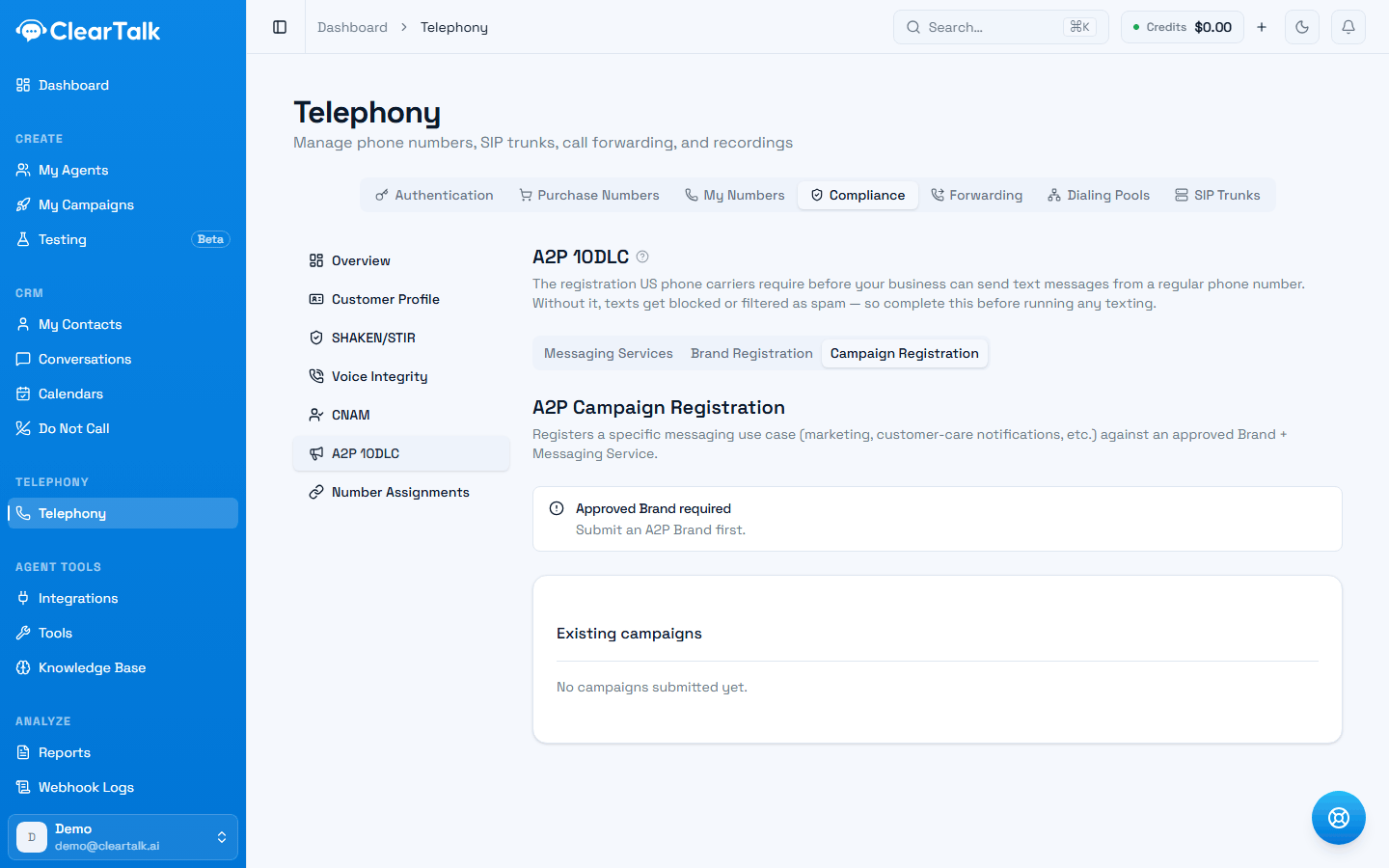
- 1Not an error — just the ordering. Come back once the Brand card on the Overview reads Approved.
Once it does, you fill in the use case and samples, and end up here:
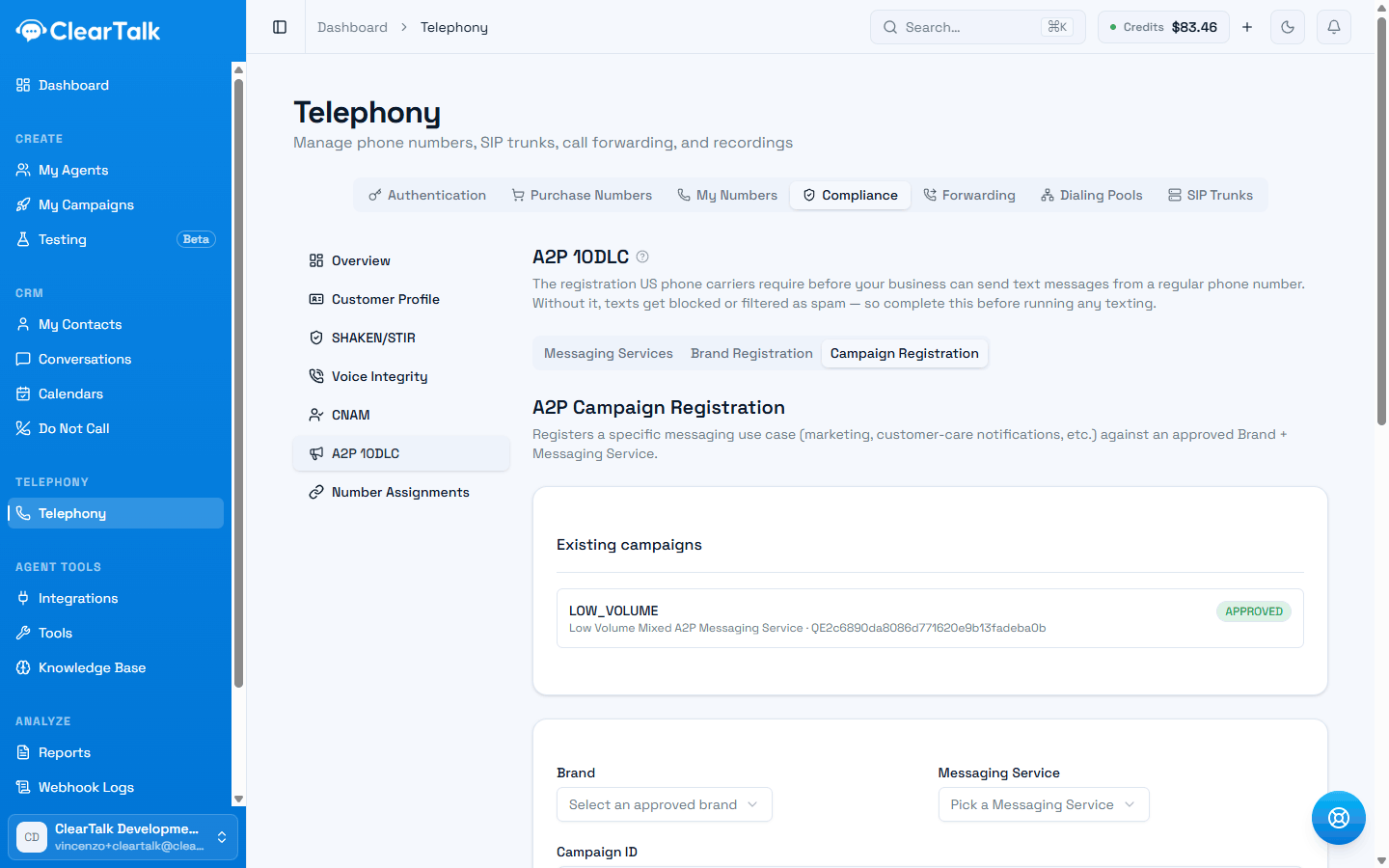
- 1Approved, with its use case and the Messaging Service your numbers hang off.
- 2A campaign is registered against one Brand and one Messaging Service. A second use case means a second campaign.
And this is the form itself — the part of registration that's actually writing rather than paperwork:
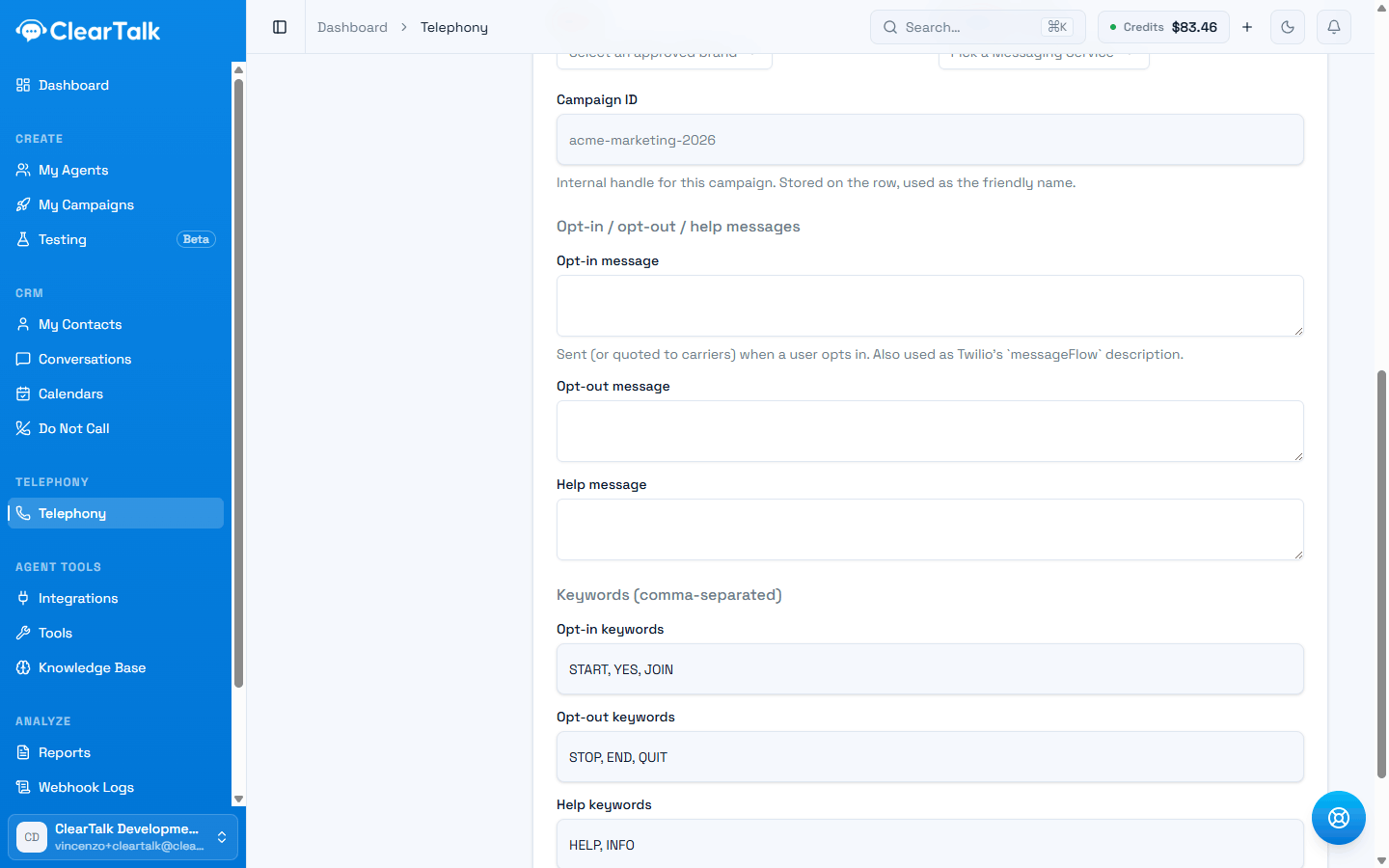
- 1Name your business in all three, and put the opt-out instruction in the opt-in message. Those two things are most of the difference between approved and sent back.
- 2Pre-filled with the standard keywords. Leave them unless you have a specific reason — carriers expect exactly these.
- 3STOP must work. It's a legal requirement, not a nicety, and ClearTalk honours it automatically on any number you register.
Keep your own copy of what you wrote
Once a campaign is approved, ClearTalk shows you its name and a carrier reference — but not the three messages you submitted. Carriers compare your live traffic against them, so paste them somewhere you'll still have in six months, before you submit.
What gets registrations rejected
Gets approved
- Business details copied exactly from your official registration.
- Messages that name your business, so it's obvious who is texting.
- An opt-in message that spells out how to stop — “Reply STOP to unsubscribe”.
- Wording that matches the texts you'll actually send.
Gets sent back
- A trading name that doesn't match your filing.
- Generic samples that could belong to any business.
- No STOP instruction anywhere in the three messages.
- Placeholder text you meant to come back and replace.
Use cases in restricted categories — debt collection, gambling, and similar — need their own special registrations on top.
After approval
- Your daily sending volume is governed by your Brand's trust level. ClearTalk's texting campaigns also let you set a per-day send cap, which you should keep within your approved throughput.
- Keep your actual messages consistent with what you registered. Carriers compare.
- Approval doesn't exempt you from consent and quiet-hours rules — see the texting compliance playbook.
Once you're approved, Texting covers building the agent, writing the opening message, and running a message sequence.
Outbound calling without getting flagged
How many dials each number can safely make, why warm-up and rotation matter, and how to recover a flagged number.
Managed numbers or your own carrier account
ClearTalk can provide your phone numbers, or you can bring your own Twilio account. What each one can actually do, and which to pick.