
Follow-ups and quiet conversations
What happens when a lead stops replying mid-conversation — the timeout, the follow-up schedule, how each nudge gets written, and how hard to chase.
Two different things in ClearTalk chase a lead who's gone quiet, and they never both apply to the same lead. Getting them straight is most of what this page is for.
Message sequence
On the campaign
- Runs before the lead has ever replied.
- Scripted copy you wrote, on a day-offset schedule.
- Ends permanently the moment they reply.
- Measured in days.
Follow-ups
On the agent
- Runs after a conversation has started and gone quiet.
- Written by the agent, in the context of the thread.
- Stops when they reply again, or opt out.
- Measured in minutes or hours.
What counts as "quiet"
The agent's Timeout setting — under SMS Settings, in minutes, defaulting to 30 — is the whole definition. When a lead hasn't replied for that long, the conversation is quiet and the follow-up schedule starts running.
Timeout is measured from the last message in the thread, not from the start of the conversation. A lead who replies every twenty minutes for two hours never triggers a follow-up.
The follow-up schedule
Turn on Enable Follow-Ups and you get a list of intervals. Each entry is a number and a unit — minutes, hours, or days — and they fire in order after the conversation goes quiet.
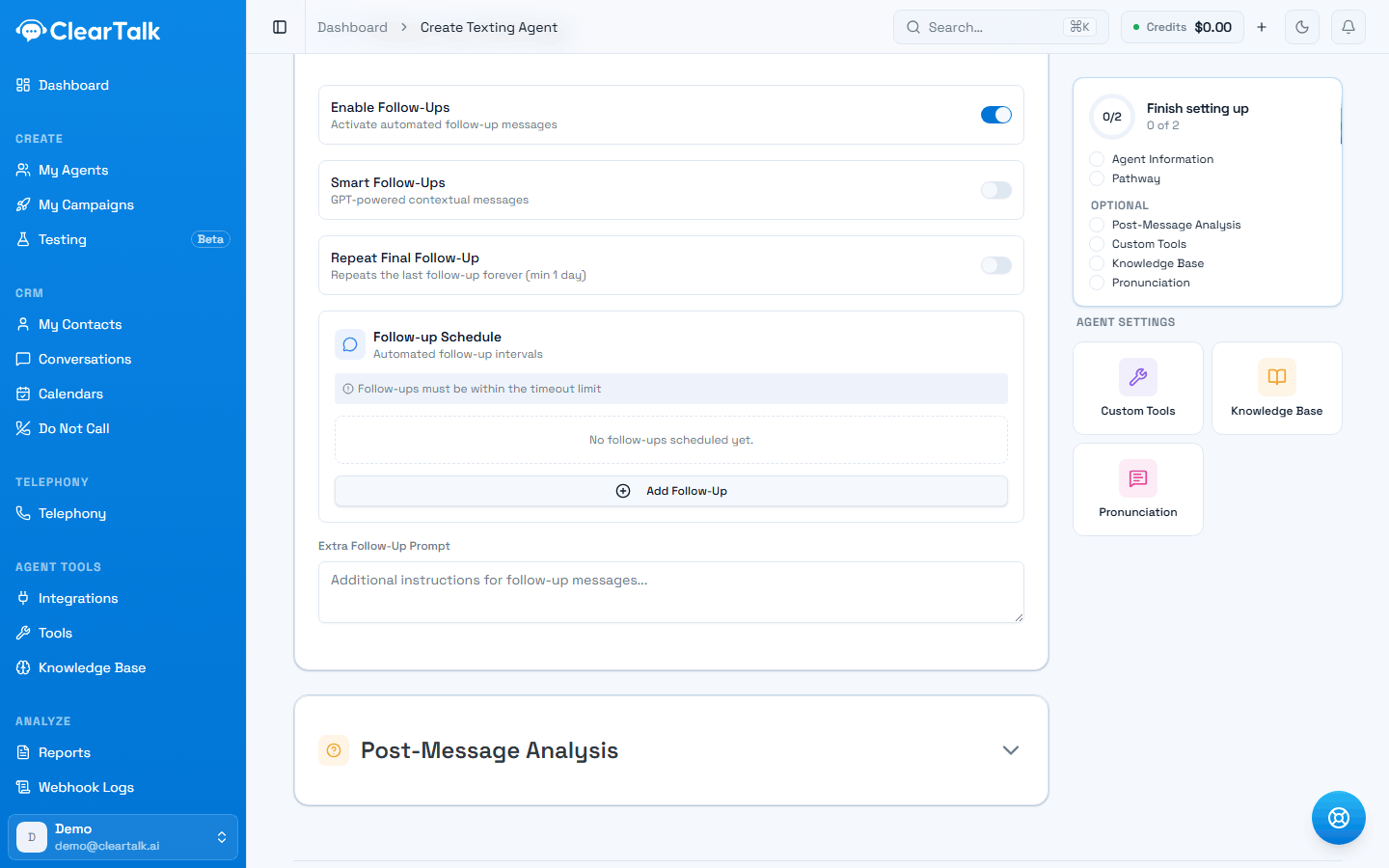
- 1The master switch — the rest of the section appears once it's on.
- 2Repeat the last one forever. Read the warning below before touching this.
- 3The schedule itself. Add one entry per nudge, in order.
- 1
5 minutes
Catches someone who got distracted mid-thread. Often the highest-converting nudge of the three.
- 2
4 hours
Same day, different context — they're out of the meeting now.
- 3
1 day
The last honest attempt. Beyond this you're annoying them.
Follow-ups have to fit inside the timeout window, and the form warns you when they don't.
How each nudge gets written
There's nothing to switch on. Every follow-up is written fresh, in the context of the actual conversation, rather than being pulled from a canned line. It's the difference between:
"Just following up!"
and
"No rush — did you want me to check Thursday morning instead, or is next week easier?"
The second one reads like the person who was already talking to them, because it is.
This used to be a switch
Smart Follow-Ups was an opt-in toggle, off by default. It's gone — contextual writing is how follow-ups work now, for every agent. If yours was off, your follow-ups will read differently from here on.
Repeat final follow-up
Repeat Final Follow-Up makes the last entry repeat indefinitely until the lead replies or opts out. There's a one-day minimum on that interval, enforced by the platform.
Think hard before turning this on
This is the only setting in ClearTalk that texts someone forever. It has legitimate uses — a customer who asked you to keep checking in, a high-value deal that's genuinely still live. It is not a growth tactic. Repeated unsolicited texts are how numbers get reported, and a spam complaint follows your brand registration, not just the campaign.
Extra follow-up instructions
A free-text box for anything the agent should know specifically when following up, as opposed to during the main conversation. Useful for tone:
"Keep follow-ups to one short line. Never repeat the offer — just make it easy to reply. If they mentioned a specific date, reference it."
These are instructions to the agent, not a message. Whatever you write here shapes the nudge; it's never sent to the lead as-is.
How hard should you chase?
There's no universal answer, but there is a shape that works.
3
follow-ups is where most of the value is
5 min
the first nudge, while they're still on their phone
1 day
past this, reply rates collapse
The pattern that works is fast, then spaced, then stop. Most recovered conversations come back within minutes of the first nudge — the lead was distracted, not uninterested. After a day of silence, the return rate on further texts is low enough that the complaint risk outweighs it.
For what to actually put in the Extra follow-up instructions box, and the research behind it, see Writing follow-ups that get replies.
A schedule that respects people
- Three follow-ups: 5 minutes, 4 hours, 1 day.
- Extra instructions written for tone, so each nudge sounds like the thread.
- Repeat turned off.
- Working hours set, so nothing fires at 2am.
A schedule that gets you reported
- Seven follow-ups, each 30 minutes apart.
- The same generic “Just checking in!” every time.
- Repeat on, indefinitely, for cold leads.
- No working hours, so the 4-hour nudge lands overnight.
When someone replies again
The follow-up schedule resets. The agent picks the conversation back up in its pathway wherever it left off, and the clock starts over from the new last message.
If they reply with STOP — or any recognized opt-out wording — they're blocked immediately and permanently, and no further message of any kind goes out. See Opt-outs and blocked numbers.
Texting campaigns and message sequences
The opening message, the scripted sequence that runs until someone replies, message versions, send caps, and working hours.
Opt-outs and blocked numbers
How STOP is handled, the four ways a number lands on the blocklist, and the one situation where unblocking is legitimate.