
Building a texting agent
Every section of the texting agent form — the pathway, the number, appointment booking, conversation timeout, and post-message analysis.
A texting agent is created under My Agents → Create → Texting Agent. The form is shorter than the voice ones, because texting removes a whole category of decisions: no voice, no speed, no interruption handling, no transfer numbers.
Start with the pathway
There is no plain-instructions option here
Voice agents let you choose between plain-English instructions and a pathway. Texting agents don't — they are pathway-driven by design. If you've only ever written agent instructions, build a pathway first and come back. Pathways covers it from an empty canvas.
Texting suits pathways better than voice does, for a reason worth understanding: people reply to texts hours later, in fragments, out of order, and often about something else entirely. A pathway gives you an explicit place to handle each of those cases. It also means you can test the conversation with simulated leads before a real one sees it.
Two details are decided for you and aren't shown on the form: a texting agent always runs its pathway's published version, and always starts from the first step. There's no staging-version option the way there is for voice.
Agent Information
Agent Name is internal — leads never see it. Name it after the job, not the channel: "Inbound Lead Qualifier" beats "SMS Agent 2".
Phone Number is the number your texts come from. The dropdown only lists numbers that are on your own carrier account, SMS-capable, and A2P-registered — each one carries an A2P badge. If the list is empty or you see a warning instead of a dropdown, registration isn't finished; the link in that warning takes you to Telephony → Compliance.
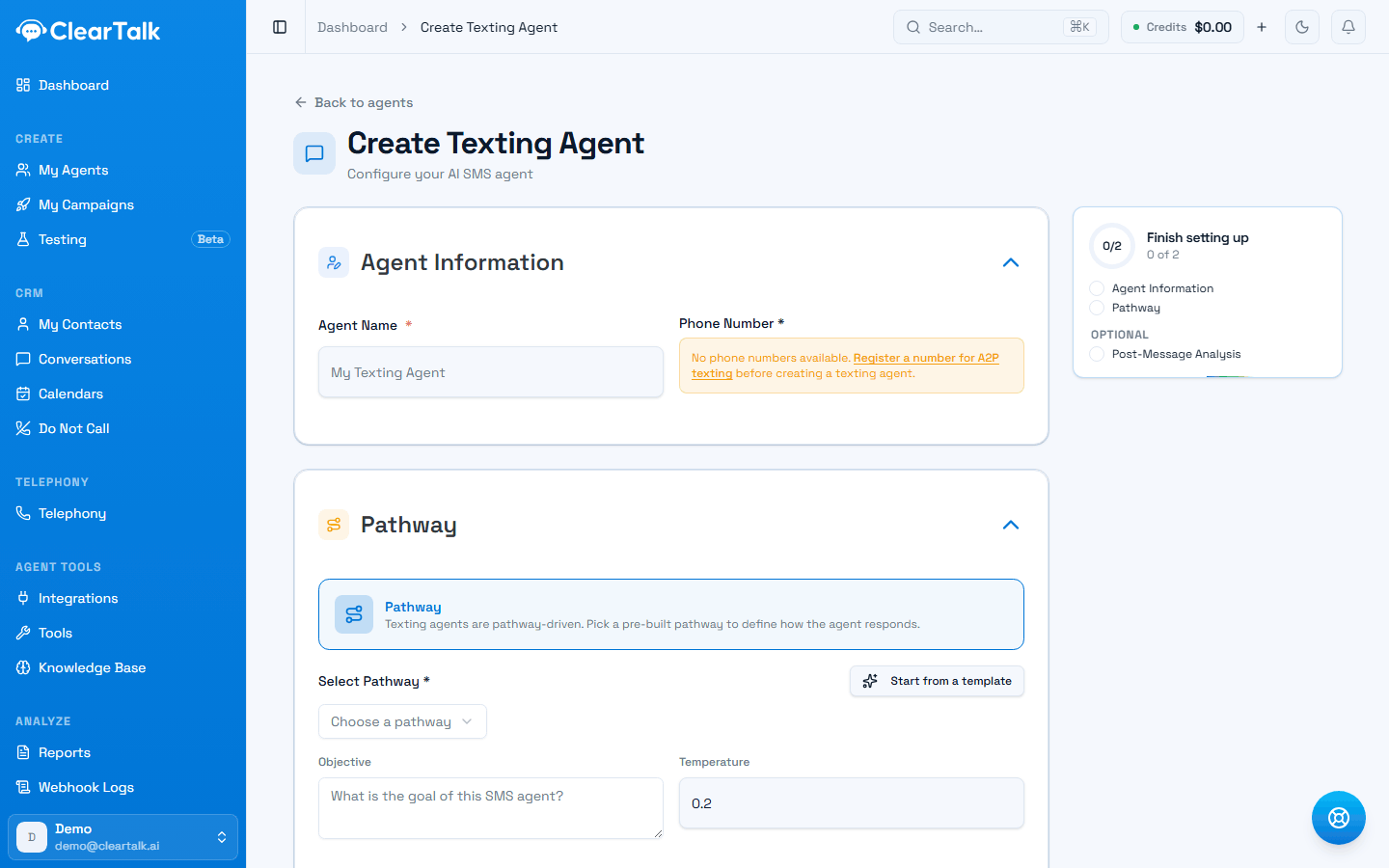
- 1No registered number, so there's no dropdown to pick from — the link goes straight to the registration screen. This is the most common reason people get stuck here.
- 2Texting agents are pathway-driven. There's no plain-instructions option to switch to.
- 3Objective is a plain-English fallback for anything the pathway didn't anticipate.
- 4The setup checklist tracks the two required sections and one optional one, Post-Message Analysis.
On an account that has finished registration, the same field is a dropdown instead:
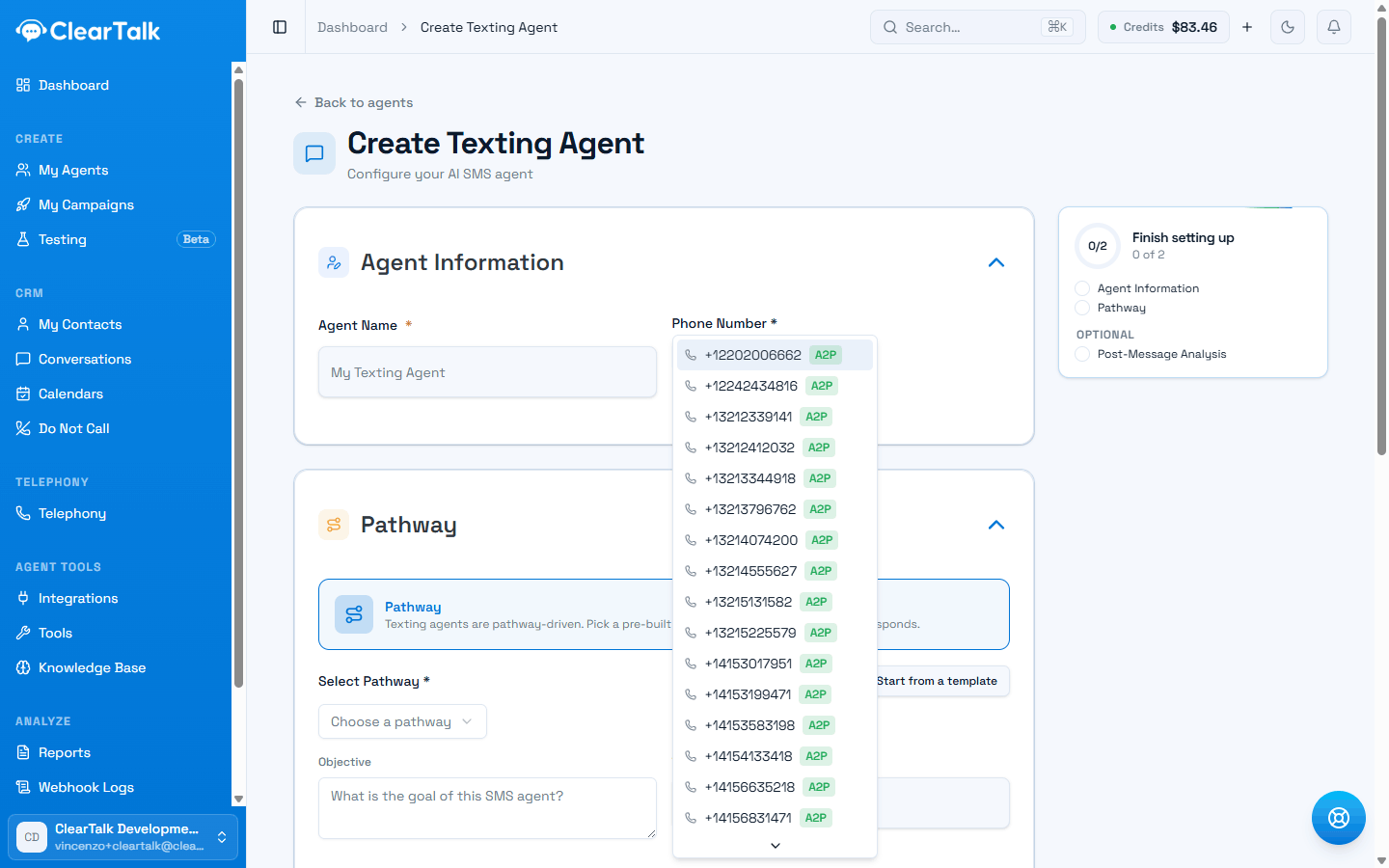
- 1The A2P badge is the filter. A number without one isn't in this list at all, however many you own.
- 2Every registered number appears here — they're attached to your campaign automatically, including ones you buy later.
One number, one conversation thread
A lead who has texted this number before will see new messages in the same thread as the old ones. If you run genuinely separate programs — appointment reminders and cold outreach, say — consider separate numbers so the two don't read as one confusing conversation.
The pathway section
Pick your pathway from the dropdown, or use the quick-pick to start from a template built for texting.
Objective is a short plain-English statement of what this agent is trying to achieve. It doesn't replace the pathway — it gives the agent a sense of what it's for when a lead says something the pathway didn't anticipate.
Temperature controls how much the agent varies its wording, from 0 to 1. It defaults to 0.2, and for texting that's a good default: low temperature means predictable, on-message replies. Raise it if the agent sounds robotic and repetitive; lower it if it starts improvising in ways you didn't intend.
A useful objective
- “Qualify inbound roofing leads and book a free inspection with someone in the service area.”
- “Confirm or reschedule tomorrow's appointments, and flag anyone who wants to cancel.”
A wasted one
- “Be helpful and answer questions.”
- “Follow the pathway.”
Appointment booking
Turn on Appointment Agent and pick the calendar the agent books into — either a ClearTalk calendar (your event types and schedules) or a calendar from a connected CRM. The agent gets two abilities automatically: look up open times, and book one.
Texting always presents times in your organization's time zone. Voice agents can detect the caller's time zone live; a text conversation has no equivalent signal, so the choice isn't offered here rather than shown and quietly ignored.
Full detail in Booking appointments in a conversation.
SMS settings
This section holds the operational knobs.
| Setting | What it does |
|---|---|
| Webhook URL | Where ClearTalk posts conversation data as it happens. See Send data to your system. |
| Notify me when | Either at the end of the conversation, or on every single message. Start with the end — per-message is a lot of traffic. |
| Messaging Service SID | Optional. Only needed if you're routing through a specific messaging service on your carrier account. Leave blank otherwise. |
| Timeout (minutes) | How long to wait for a reply before the conversation counts as gone quiet. Defaults to 30. |
| Request Data | Extra key/value pairs attached to every webhook payload. Useful for tagging which agent or environment a payload came from. |
Timeout is the most consequential setting here. It's what decides when a conversation is "quiet" — and therefore when follow-ups fire. Set it too short and the agent nags someone who's just in a meeting. Too long and a warm lead cools off. Thirty minutes is a sensible default for daytime conversations.
Follow-ups
Turned off by default. When on, the agent chases a conversation that's gone quiet mid-thread — this is separate from the campaign's message sequence, which only runs before anyone has ever replied.
Because the distinction matters, it has its own page: Follow-ups and quiet conversations.
Post-message analysis
Same idea as the voice agents' post-call analysis. You define questions, and after the conversation ends the agent answers them from the transcript — "Did they agree to a callback?", "What objection did they raise?", "What's their budget?"
The answers land on the conversation record and go out in your webhook payload, which makes them the cleanest way to get structured data out of a free-form text conversation and into your CRM.
Tools and a knowledge base live on the pathway
Voice agent forms have a right rail for attaching tools, a knowledge base, and pronunciation overrides. A texting agent's form doesn't — because a texting agent always runs a pathway, and the upstream SMS configuration has no field for any of the three. Pronunciation genuinely doesn't apply to text. Tools and a knowledge base still do, but you add them to the pathway, not the agent:
Tools
Drop a Custom Tool step into the pathway to look things up in your systems or write records back, mid-conversation.
Knowledge Base
Add a Knowledge Base step to answer from your pricing, policies, and FAQs instead of guessing.
A knowledge base is the higher-value of the two for texting. Leads ask direct factual questions over text — price, hours, whether you cover their area — far more bluntly than they do on a call.
Before you point real leads at it
- Test the pathway with simulated leads. Texting agents can be tested end to end without spending a message — see Testing your pathway.
- Text it yourself from your own phone. Read it as a recipient, not as its author.
- Send STOP and confirm you're blocked. It's the one behavior you cannot afford to get wrong, and it takes ten seconds to verify.
- Check the timing. Send a message right at the edge of your working hours and confirm it behaves the way you expect.