
Texting campaigns and message sequences
The opening message, the scripted sequence that runs until someone replies, message versions, send caps, and working hours.
A texting campaign is the outreach half of texting. It decides who gets contacted, what the first message says, and — if you want one — the scripted series of texts that runs until they reply.
It waits to be triggered
Standard and texting campaigns do not start sending on their own. Nothing happens until a lead's details are posted to the campaign's trigger address. This is the single most confusing thing about campaigns — see Triggering a campaign for how to wire it up.
The opening message
The greeting message is the first text every lead receives. Use Insert field above the box to drop in a contact's details — first name, last name, phone — which are filled in per lead and quietly removed if you don't have that detail for someone.
Leave it blank and the conversation opens with the agent pathway's first step instead.
This message does more work than any other in the whole setup. It decides whether you get a reply at all.
Gets replies
- “Hi {{firstName}}, it's Dana at Brightside Roofing — you asked about a roof inspection last week. Still want me to get one booked?”
- Names a real person and a real business.
- References something the lead actually did.
- Asks one short question that's easy to answer.
Gets ignored or reported
- “Hello! We have an exciting offer for you today! Click here to learn more!”
- No business name, so it reads as a scam.
- No reference to why you're texting them.
- A link in the first message — the fastest way to get filtered.
Write it as a person, not as a broadcast. The single biggest predictor of reply rate is whether the message reads like it was typed by someone who knows why they're texting you.
Business name
The Business Name field is the brand your leads recognize — not your agency name, not your account name. It's used in the automated compliance replies, so when someone texts HELP they're told who's actually texting them.
You can set an organization-wide default in your settings and leave this blank on each campaign. If there's no default set, the field is required here — every texting campaign has to have a sender identity.
Message sequences
By default, a campaign sends one text — the greeting — and the agent handles whatever comes back. Turn on Message sequence when you want a scripted ladder that keeps going until they reply.
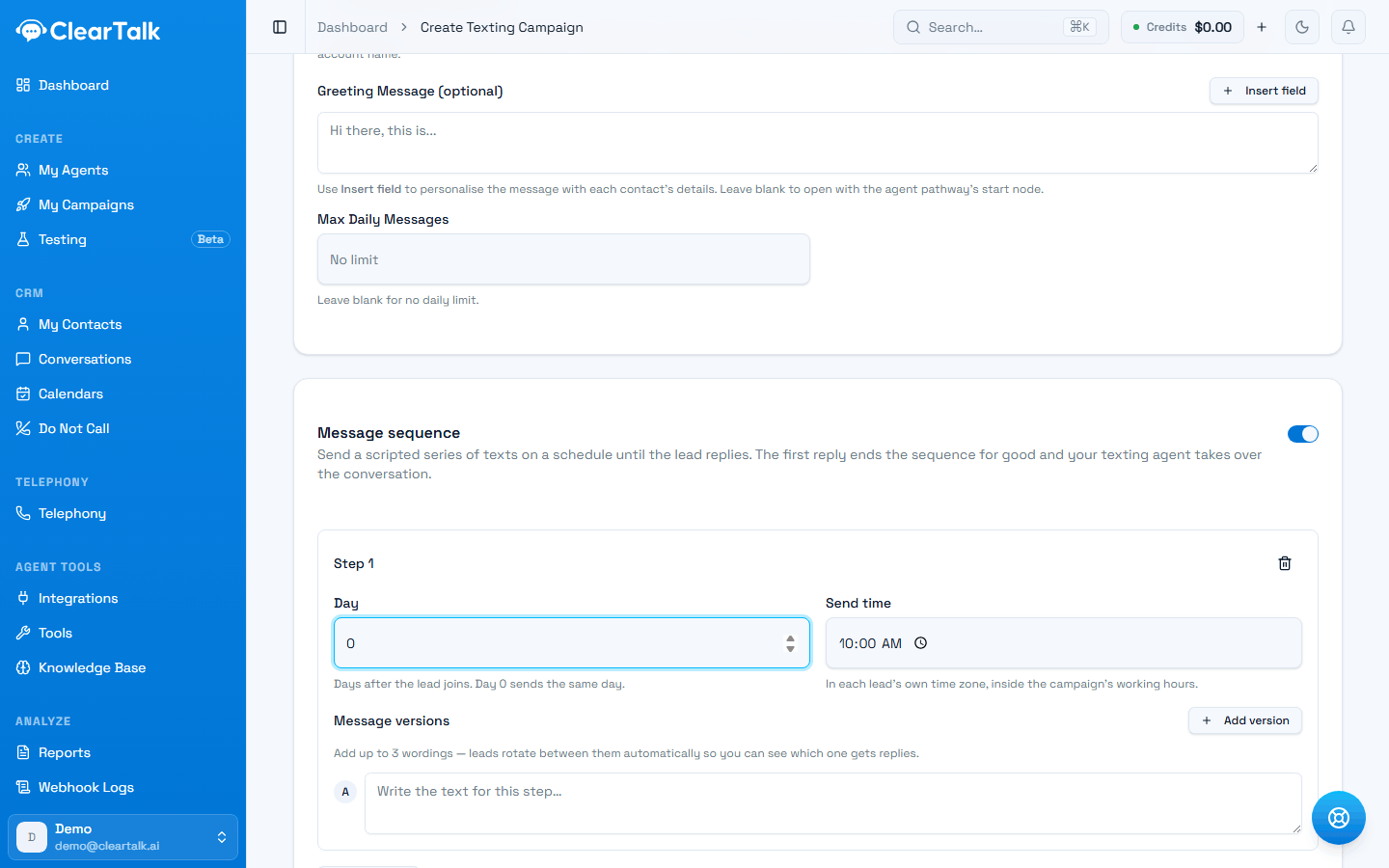
- 1The whole sequence off/on. Off means one greeting text and nothing more.
- 2Day 0 sends the same day the lead arrives. Later steps count forward from there.
- 3Send time is in the lead's own time zone, and still has to fall inside your working hours.
- 4Add up to three wordings per step — leads rotate between them so you can see which earns replies.
- 1
Day 0, 10:00 — the greeting goes out
Same day the lead arrives.
- 2
Day 2, 10:00 — step two
Only if they still haven't replied.
- 3
Day 5, 14:00 — step three
Different time of day gives you a second shot at their schedule.
- 4
Day 9, 10:00 — final step
After this, either the lead is marked completed or the agent's follow-ups take over.
The rules the sequence runs under:
| Rule | Detail |
|---|---|
| Length | Up to 10 steps per sequence |
| Frequency | At most one text per lead per day, however you space the steps |
| Timing | Each step has a day offset and a send time, in the lead's own time zone |
| Window | Sends only inside the campaign's working hours |
| Exit | The first reply ends the sequence permanently |
| Length limit | Each message under 1,600 characters |
Skip Sundays and skip US holidays
Both are on by default. A text scheduled for a Sunday or a federal holiday moves to the next open day rather than being skipped entirely — so a lead never silently loses a step.
Message versions
Each step can hold up to three wordings. Leads rotate between them automatically, and replies are attributed back to the version that earned them.
This is the cheapest experiment available to you. Write two genuinely different openers — not one with a comma moved — and after a few hundred leads you'll know which one your market responds to.
A worthwhile test
- Version A asks a question; version B makes a statement.
- Version A leads with the offer; version B leads with the reason you're texting.
- Version A is one line; version B is three.
A wasted one
- “Hi John!” versus “Hi John,”
- Two versions that say the same thing in different words.
- Three versions you'll never look at the results for.
When the sequence runs out
If every step has gone out and the lead never replied, you have two choices, set by Keep nurturing when the sequence ends:
- Off (default) — the lead is marked completed and you stop texting them.
- On — the agent's AI follow-ups take over and keep nudging until they reply or opt out.
Off is the right default. A lead who ignored four scripted texts is telling you something, and perpetual nudging is how numbers get reported as spam. Turn it on only for high-value leads where you'd genuinely keep trying by hand.
Send caps and working hours
Max Daily Messages caps how many texts this campaign sends per day. Leave it blank for no limit — but don't, if you're sending at volume. Your approved throughput is governed by your brand's trust level, and exceeding it gets messages filtered rather than delivered.
Working hours set the window when texts may send, per day of week. If you leave them unset, sending falls back to a compliant 9:00–19:00 window, seven days a week.
The window is read in the recipient's local time
Texting outside permitted hours is a compliance violation in most US jurisdictions, and the time that matters is the recipient's — which is what the sender uses. Each contact's window comes from their area code, falling back to your account's timezone when the area code doesn't resolve.
So a 9:00–19:00 window means 9:00–19:00 where they are, and a nationwide list needs no special handling. Note this differs from calling, where the same setting is read in your timezone — see whose clock the window is read in. See also Texting compliance.
Results
Like voice campaigns, a texting campaign can override your organization's default result list with its own. Use it when this campaign's outcomes genuinely differ from the rest of your business — a reminder campaign's results ("confirmed", "rescheduled", "cancelled") look nothing like a cold outreach campaign's.
See Define what counts as a win.
Why a message didn't send
A campaign that's running won't text every contact every time, and most of the reasons are deliberate. Before assuming something is broken, check this list — it's the complete set.
| What happened | Why | What to do |
|---|---|---|
| They already replied | The sequence never talks over a live conversation. Once someone answers, the ladder stops for them. | Nothing — this is the point. Pick it up in Conversations. |
| A teammate replied by hand | Replying to a thread yourself turns automation off for that conversation, permanently. | Nothing, and it can't be undone — see below. |
| They opted out | STOP, or anything the system read as opting out. | Nothing. Don't work around it. |
| They're on Do Not Call | Your list, or a sync from your CRM. | Check the Do Not Call list if it looks wrong. |
| Outside working hours | The send window, holidays, or Sundays if you've excluded them. | Nothing — it goes at the next open slot. |
| Out of credits | The balance can't cover the message. | Top up. The sequence pauses rather than ends, and resumes once you do. |
| Already in the sequence | The lead was triggered twice; the second is ignored. | Dedupe in whatever posted it. |
| The message came out empty | Every variable in it was blank, so nothing was left to send. | Check the field names — see using what you sent. |
Replying by hand ends automation for that thread — for good
The moment anyone on your team sends a manual reply in a conversation, that thread's sequence and follow-ups switch off permanently. There is no way to hand it back to the agent. The reply box warns you before the first one; after that the thread is yours.
It's the right default — the alternative is an agent talking over a colleague mid-conversation — but it does mean "just checking in on this lead" quietly takes the lead out of your automation. If you only meant to look, don't send.
Out of credits is the only one of these that's temporary. Every other row is a decision the system made on purpose and will keep making.
A checklist before you turn it on
- The agent is attached and its pathway is published.
- The greeting message reads like a person wrote it, and names your business.
- Business name is set — here or as your organization default.
- Working hours are set deliberately, not left to the fallback.
- A daily cap is set if you're sending at any volume.
- You've sent yourself the opening message and read it on a phone.
Building a texting agent
Every section of the texting agent form — the pathway, the number, appointment booking, conversation timeout, and post-message analysis.
Follow-ups and quiet conversations
What happens when a lead stops replying mid-conversation — the timeout, the follow-up schedule, how each nudge gets written, and how hard to chase.