
Campaign settings
Working hours, follow-up actions, and limits — the settings every campaign shares, and what each one protects you from.
Three settings appear on every campaign whatever its type. They're easy to skip and expensive to get wrong.
Working hours
Which days and times this campaign may contact people. Uncheck a day and nothing goes out on it; contacts waiting when a day is skipped roll over to the next selected day rather than being dropped.
Copy to All applies one day's hours to every selected day, which is how most people set this up in about ten seconds.
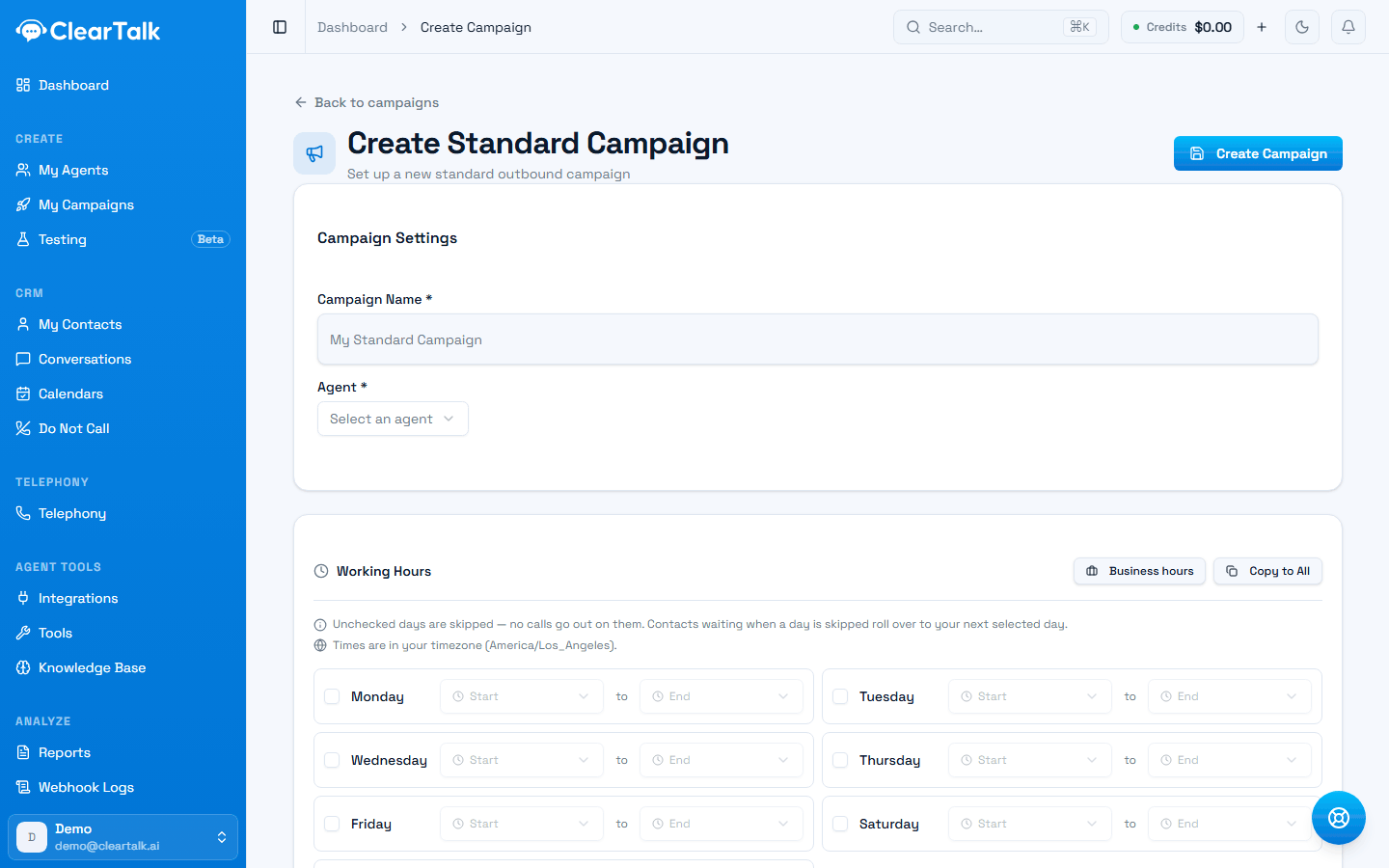
- 1Business hours fills a weekday 9–5; Copy to All spreads one day across the rest.
- 2Read this line every time — and see below, because texting reads the window differently.
- 3Leave a day unchecked and nothing goes out — waiting contacts roll to the next open day.
Whose clock the window is read in
The same setting, read against a different clock on each channel. This is the part that catches people out:
| Channel | The window is read in | So a 9:00–17:00 window means |
|---|---|---|
| Calling | Your timezone | 9:00–17:00 where you are, for everyone on the list |
| Texting | The recipient's timezone | 9:00–17:00 where they are, worked out per contact |
For texting, each contact's local time comes from their area code, falling back to your account's timezone when the area code doesn't resolve. That's the right behaviour — quiet-hours rules follow the person receiving the message — and it means a nationwide text campaign needs no special handling.
Calling across time zones is the case to watch
Because calling hours are read in your timezone, they don't follow the person you're dialing. If your business is in Denver and you're calling a list in Boston, a 9:00 start is 11:00 for them — and a 17:00 finish is 19:00, which in some jurisdictions is a problem.
If you call across time zones, set your hours to the narrowest window that's legal everywhere on your list. It costs you an hour or two a day and removes an entire category of risk. Texting needs no equivalent care, because the window already moves with the recipient.
Calling and texting hours are both regulated, and the rules follow the recipient. See Texting compliance for the texting side, and check what applies to calls in the jurisdictions you dial.
Follow-up actions
Which call results should trigger a follow-up. Results are grouped into successful and unsuccessful contact:
| Result | What it means |
|---|---|
| Appointment Booked | They agreed to and scheduled an appointment |
| Follow Up | They asked to be reached again later |
| Transfer | The call was handed to a person or another number |
| Voicemail | It reached voicemail rather than a person |
| No Answer | They didn't pick up |
| Busy | The line was busy |
By default a campaign inherits your organization's settings. Turn on the override when this campaign genuinely needs different behaviour.
The obvious case is voicemail. On a warm inbound lead, retrying a voicemail is right — they asked you to call. On a cold list, retrying every voicemail multiplies your dials for very little return and pushes your numbers harder than they should be pushed.
Worth retrying
- No Answer on a lead who filled in a form ten minutes ago.
- Busy — they were on the phone, try again shortly.
- Follow Up, at the time they actually asked for.
Usually not
- Voicemail on a cold purchased list.
- Every unsuccessful result, on everything.
- Anything at all on a contact who asked not to be called.
Renaming results to match your business, and choosing which one counts as a win, is covered in Define what counts as a win.
Limits
Max daily calls or Max daily messages caps the campaign's output per day. Leave it blank for no limit — but don't, at volume.
For calls, this is a deliverability control. Your ceiling is roughly 50–75 dials per number per day, and the cap is what stops a mis-set batch size from blowing straight through it.
For texts, this is a throughput control. Your approved sending volume is governed by your brand's trust level, and going over it means messages get filtered rather than delivered.
Callback limit (Batch Calls) caps how many times a contact who asked to be called back actually is. Without it, a handful of "call me next week" contacts can absorb a surprising share of a day's dialing.
A sensible default setup
For a cold outbound calling campaign:
- 1
Working hours: Mon–Fri, 10:00–16:00
Narrow enough to be safe across time zones, and it avoids the worst answer-rate hours anyway.
- 2
Follow-up on No Answer and Busy only
Not voicemail. Not on a cold list.
- 3
Daily cap sized to your numbers
Number count × 75, and no higher.
- 4
Callback limit: 3
Enough to be persistent, not enough to be a nuisance.
For a warm inbound campaign triggered from a form, open the hours up to your real business hours and retry more aggressively — someone who just asked you to call them is a different situation entirely.
What to check after a week
- Answer rate by hour. Most businesses find one or two hours doing far better than the rest.
- Whether your follow-up settings are actually helping. Compare the result rate on first attempts against retries.
- Whether you're near your daily cap. If you're hitting it every day, you need more numbers, not a higher cap.