
Campaigns
The three campaign types, which one to use, and the single fact that confuses more new customers than anything else in ClearTalk.
A campaign is how you reach out to a list of people. It pairs an agent with a set of rules — when to contact, how often, what counts as a result — and then either waits for leads to be handed to it, or works through a list on a schedule.
Read this before anything else
Outbound Calls and Text Messages campaigns do not start on their own. They sit there doing nothing until a lead's details are sent to their trigger address. Only Batch Calls campaigns work through a list by themselves. Most "my campaign isn't doing anything" questions are this.
The three types
Under My Campaigns → Create Campaign:
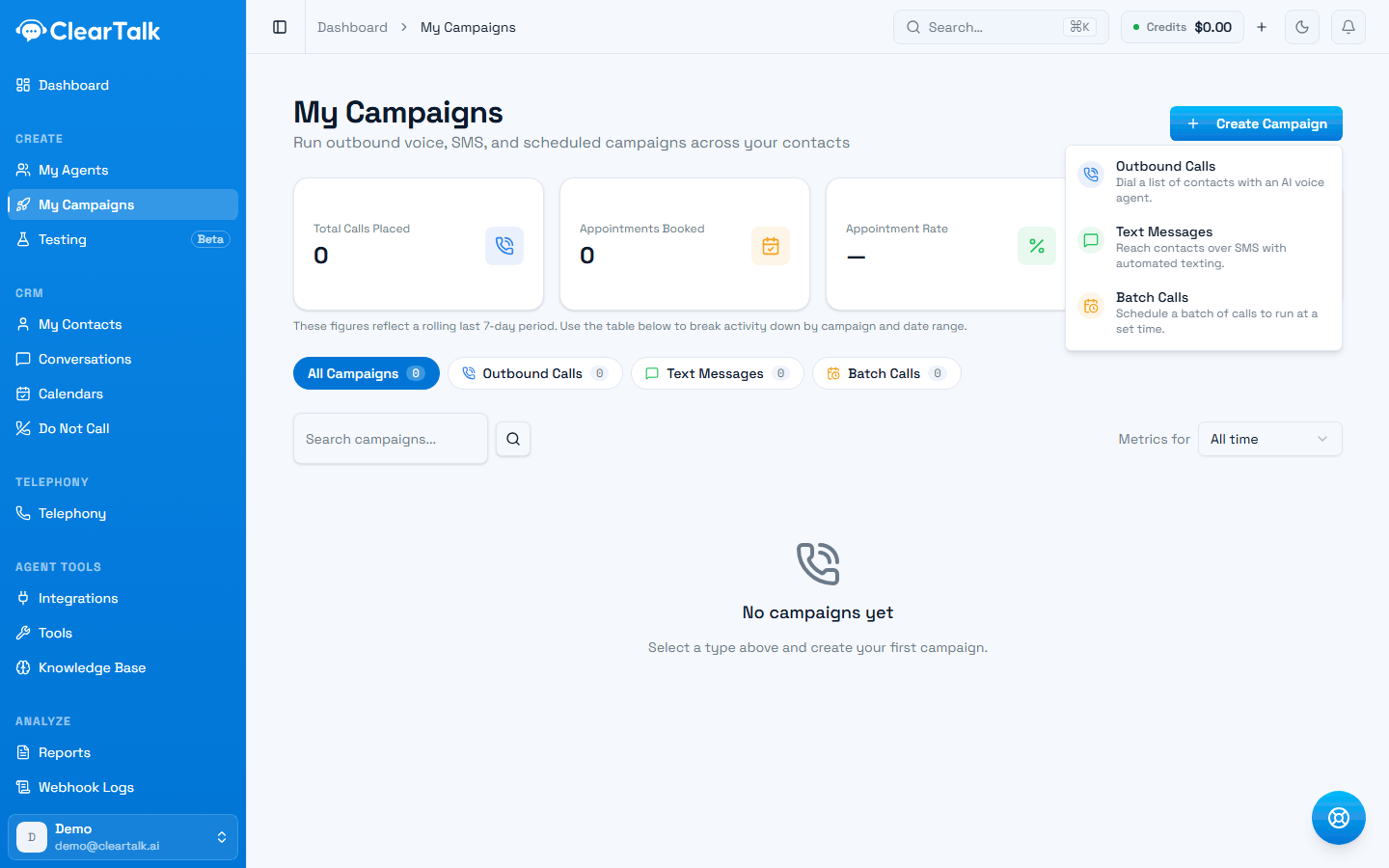
| Type | Channel | Starts when | Contacts come from |
|---|---|---|---|
| Outbound Calls | Voice | A lead is posted to it | Your CRM, website, or software |
| Text Messages | SMS | A lead is posted to it | Your CRM, website, or software |
| Batch Calls | Voice | The scheduled start time | Your ClearTalk contacts |
Outbound Calls and Text Messages
Triggered
- One lead at a time, as they arrive.
- Fires within seconds of a lead being posted.
- Right for inbound leads, form fills, and CRM automations.
- Needs something on the outside to send leads in.
Batch Calls
Scheduled
- Works through a list in batches on a timer.
- Starts at the date and time you set.
- Right for a list you already have.
- Uses contacts stored in ClearTalk only.
Which one do you want?
A lead just filled in a form and you want a call in 30 seconds. Outbound Calls, triggered from your form or CRM. This is the highest-value thing most businesses do with ClearTalk — speed to lead is the whole game.
You bought a list of 4,000 numbers and want to work through it. Batch Calls. Import the contacts, set a batch size and a wait, and let it run inside your working hours.
You want to text new leads and let an AI handle the replies. Text Messages. See Texting, which covers the agent, the message sequence, and opt-outs.
You want your CRM to decide who gets contacted and when. Outbound Calls or Text Messages, triggered from a CRM workflow. Your CRM keeps the logic; ClearTalk does the conversation. GoHighLevel walks through exactly this.
The question to ask is: does something outside ClearTalk already know who should be contacted? If yes, use a triggered campaign and let that system drive. If no — you have a list and nothing else — use Batch Calls.
What every campaign shares
Whatever the type, a campaign carries the same four things:
- 1
An agent
Which agent handles the conversation. Nothing happens without one.
- 2
Working hours
Days and times contact is allowed. Contacts waiting on a skipped day roll to the next open one.
- 3
Follow-up actions
Which results trigger a follow-up, either inherited from your organization or overridden here.
- 4
Limits
How many per day, and how many callbacks. Optional, but not for volume.
All four are covered in Campaign settings.
Watching a campaign work
My Campaigns shows every campaign with calls placed, answer rate, appointments, and cost, over a date range you pick. The headline figures at the top are a rolling last-seven-days view; the table below breaks it down per campaign.
Two habits are worth building:
- Compare answer rates across campaigns, not against a benchmark. Your own campaigns calling your own lists are the only fair comparison you have.
- Watch cost per appointment, not cost per call. A campaign with expensive calls and a good booking rate beats a cheap one that books nobody.
Where to go next
Triggering a campaign
The address, what to send, and how to wire it to a CRM or a form.
Batch call campaigns
Batch size, spacing, start and end dates, and how to pace a list.
Campaign settings
Working hours, follow-up actions, daily caps, and callback limits.
Texting campaigns
The opening message, scripted sequences, and message versions.
Knowledge, tools and transfers
The six optional pieces that turn a working agent into a useful one — facts to answer from, actions to take, a person to hand off to, and questions answered after every call.
Triggering a campaign
How to start an Outbound Calls or Text Messages campaign — where the trigger address lives, what to send, and how to wire it to a CRM or a form.