
Voice and call settings
Choosing a voice, and the handful of call settings that are actually worth changing — interruption, call length, voicemail, and recording.
Two screens decide how an agent sounds and behaves on a call: the Voice Selection section on the form, and the Call Settings wizard behind the button on the right.
Choosing a voice
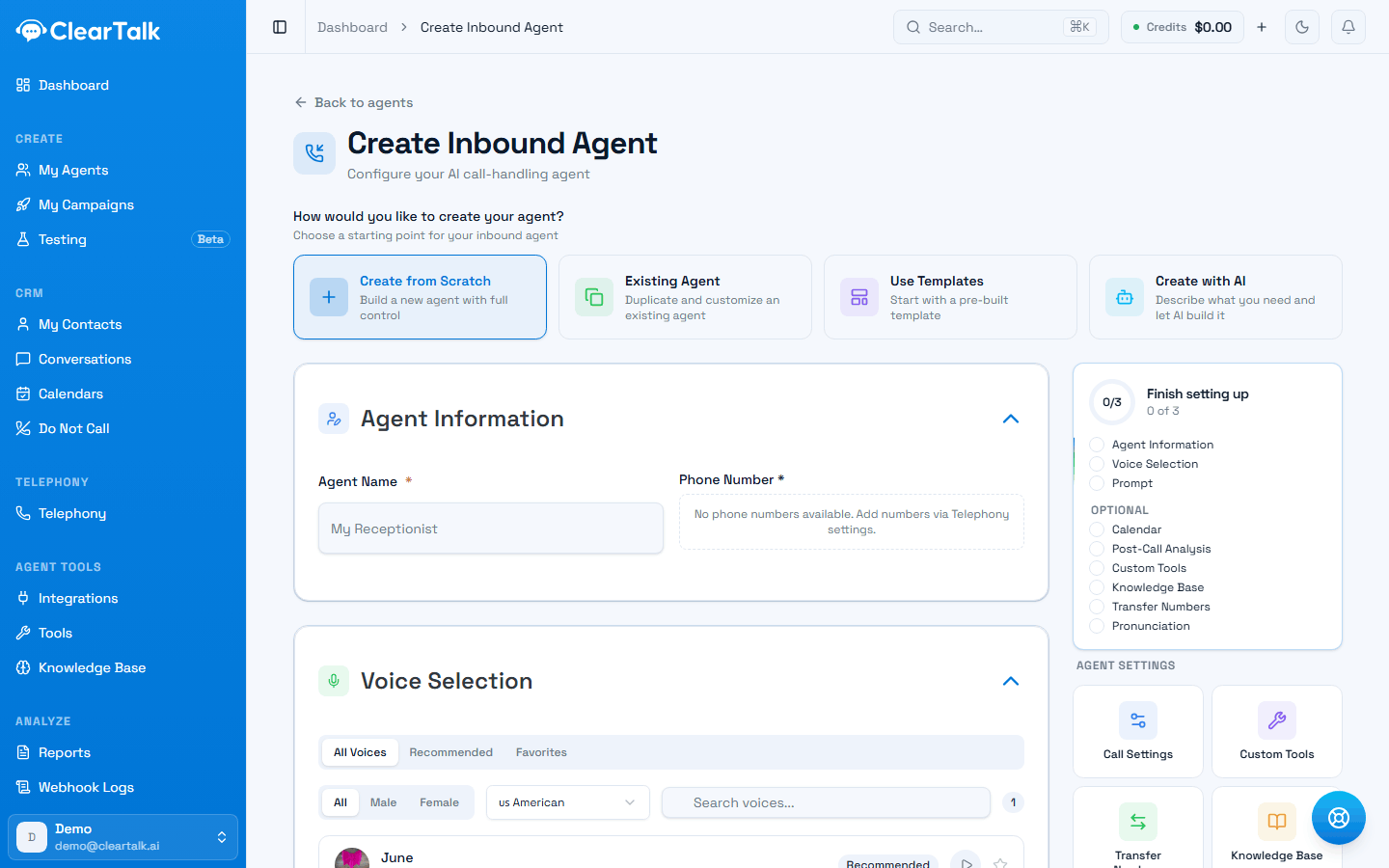
- 1Start on Recommended. It's a much shorter list, and the ones that hold up on a phone line.
- 2Filter by language first if you're not working in English — the list is long.
Preview before you commit. Every voice has a play button. A voice that reads well in a browser can sound thin or sibilant down a phone line, and thirty seconds of listening saves a week of wondering why calls feel off.
Start with Recommended. The full list is long. The recommended set is the one that holds up at telephone bandwidth.
Star your favourites so a second agent takes seconds rather than another pass through the list.
The voice is not the personality
A warm voice reading cold instructions still sounds cold. If an agent feels robotic, the instructions are almost always the cause, not the voice — particularly fixed wording repeated identically on every call.
Call settings
Everything else lives in the Call Settings wizard: five steps for an inbound agent, seven for outbound. Changes save when you save the agent.
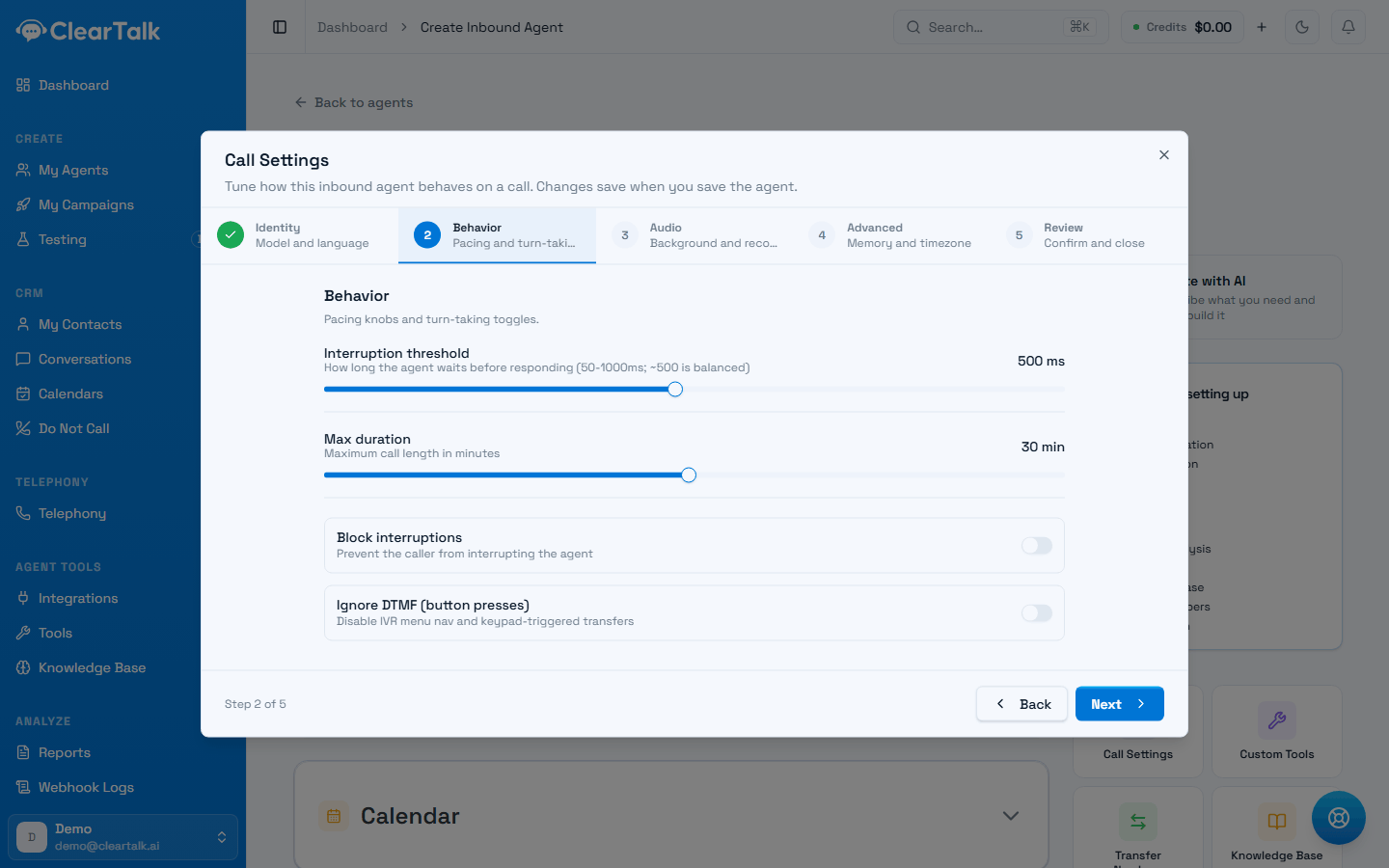
- 1The steps. Inbound has five; outbound adds Voicemail and Dispatch.
- 2Interruption threshold — the single most useful setting on this screen.
- 3Max duration. A ceiling on a stuck call, and therefore on what one call can cost.
- 4Leave both off unless you have a specific reason. Blocking interruptions makes an agent talk over people.
The four that matter
Interruption threshold — how long the agent waits after you stop speaking before it replies. Between 50 and 1000 milliseconds; 500 is balanced.
- Lower if the agent feels slow or leaves awkward gaps.
- Higher if it cuts people off mid-sentence, or if your callers pause while thinking — which they do far more on the phone than in person.
This is the setting behind most "it keeps interrupting me" complaints, and most people never find it.
Max duration — the longest a call may run, in minutes. Default 30. It's a safety net: an agent stuck in a loop with a confused caller will happily keep going, and every minute is billed. Set it to a little more than your longest realistic call.
Block interruptions — stops the caller interrupting at all. Sounds useful, rarely is: it makes the agent talk over people, which is the rudest thing it can do. Reach for it only around a disclosure that legally must be heard in full.
Ignore keypad presses — turns off menu navigation and keypad-triggered transfers. Leave it off unless keypad tones are causing you a specific problem. Inbound agents only — outbound agents get two different toggles in its place:
- Temperature — how much the agent's wording varies call to call. Lower is more predictable, higher more natural. The default suits most work.
- Wait for greeting — hold silent until the person speaks first, rather than opening the moment they pick up. Worth turning on if your openings are being talked over.
The rest, briefly
Step numbers below are for an inbound agent. Outbound inserts Voicemail and Dispatch after Audio, so everything from there on shifts by two.
- Identity (step 1) — the model and the language. Base is the default and supports tools, transfers and keypad menus. Turbo is faster but does less; only switch if latency is a real complaint and the agent uses none of those.
- Audio (step 3) — an optional background track (office, cafe, restaurant) that plays under the silences, noise cancellation on the caller's audio, and call recording. Both noise cancellation and recording start on. Recording has legal implications in many places, so make it a decision rather than a default — see call recording.
- Advanced (step 4, or step 6 on outbound) — a memory to carry context between calls, a timezone override, and pathway version pinning. Outbound agents also get voice tuning here (stability and similarity); inbound agents don't. Defaults are good; change these only to fix something specific.
- Review (the last step) — everything you've set, on one screen. Worth a glance, because it shows the values an untouched agent will actually run with rather than blanks.
Outbound only
Outbound agents get two extra steps.
Voicemail. What to do when a machine answers, and it's a real decision rather than a detail:
- Leave message — plays your recorded message after the beep, then hangs up. Costs a full connection each time.
- Hang up — no message, minimum cost.
- Ignore — treats it as a live answer, which means the agent talks to a voicemail box as though it were a person. Almost never what you want.
There's also a sensitive detection option that uses the model to judge whether it's reached a machine. It's more accurate, and slower and more expensive — worth it when leaving messages, not worth it when hanging up.
Across a large campaign this choice moves your bill noticeably. See keeping the bill sensible.
Dispatch. Which number to call from, and how numbers rotate. If you've assigned numbers to the agent, a rotation is managed for you and there's nothing to do here — see outbound deliverability for why rotation matters.
The dialing strategy offers three choices:
- Default (platform pool) — the provider picks. Fine for most work.
- Local dialing (US area-code match) — calls from a number sharing the recipient's area code where one is available. Usually the best answer rates on US lists.
- Custom pool — dial from a dialing pool you've built. Marked an Enterprise feature of the underlying voice platform, so confirm it works on your account before relying on it.
Change one setting at a time and call the agent again. These interact — a shorter interruption threshold and a background track together can make an agent feel jumpy in a way neither does alone.
Agents
The four kinds of agent, the four ways to start one, and the three things every agent needs before it can go live.
Knowledge, tools and transfers
The six optional pieces that turn a working agent into a useful one — facts to answer from, actions to take, a person to hand off to, and questions answered after every call.