
Build your first pathway
From an empty canvas to a working conversation — creating, connecting, and attaching a pathway to an agent.
This walks the shape of every pathway you'll ever build. Follow it once with something simple, and the rest of the builder makes sense.
Here's what we're building — a booking conversation, drawn the way it appears on the canvas:
Say hello and ask how you can help.
Which day, and a callback number.
Offer real open slots and confirm one.
Prefer to watch?
The Building a Pathway tutorial covers this same ground on video, including a tour of every step type.
1. Create it
From My Agents, open the Create Agent menu and choose Pathway. Give it a name that says what the conversation is for — "New patient intake", not "Pathway 2".
You can also describe what you want in a sentence and have a starting pathway generated for you. That's a good way to get a skeleton you then edit; it is not a finished conversation.
2. Learn the three areas
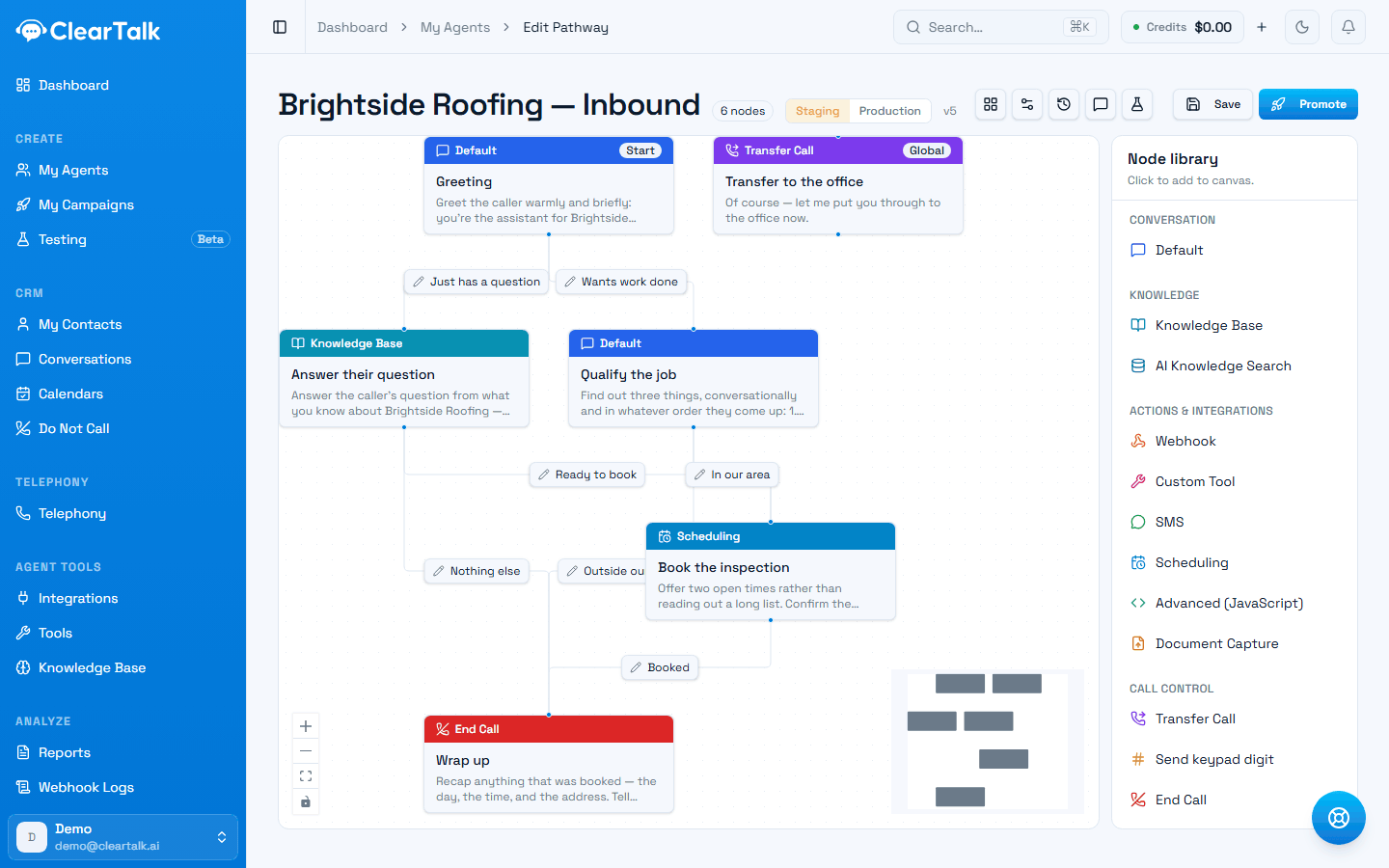
- 1The canvas — your conversation, drawn as connected steps.
- 2The node library. Click a step type and it lands on the canvas.
- 3The Start step. This is the first thing the agent does on every call.
- 4Which side you're looking at — your working copy, or what's live.
- 5Save keeps your work. Promote is what changes live calls.
- The canvas (middle) — your conversation, drawn as connected steps.
- The node library (right) — every step type you can add. Click one and it lands on the canvas.
- Step settings — click any step on the canvas to open what it says and does.
Every new pathway starts with a Start step. That's the first thing the agent does on every call.
3. Write the opening
Click the Start step. Two things matter:
- Name it for what it does — "Greeting", not "Node 1". Names are how you read the map later, and how you'll find the step when a test fails.
- Write what the agent says. You can pin the exact words, or give a prompt and let the agent phrase it naturally. Pin the words when they're regulated or when the first impression matters; use a prompt when you want it to sound alive.
Step settings hold more than this — loop conditions, variable extraction, and per-step tuning are covered in Inside a step.
4. Build one path all the way to an ending
This is the part worth doing in the right order. Finish a single path, start to hang-up, before you add the second one.
Click a step type in the node library — it drops onto the canvas. Then connect it: drag from the dot at the bottom of one step to the dot at the top of the next. That line is the path the conversation takes.
Keep going down the same line — step, connect, step, connect — until you reach an End Call step. Most conversations are mostly Default steps (say something, listen, move on) with a handful of specialised steps where something actually happens. See the node reference for the full set.
Finish one path before you start another. A pathway with one complete route works; a pathway with four half-built ones does nothing at all, and it's much harder to tell which half is broken.
At this point you have something real: a conversation that goes from hello to goodbye. Save it, try it in Test Chat, and fix what sounds wrong — all before any branching exists to complicate the picture.
5. Add the second path
Now go back to the step where the conversation could have gone a different way, and build that route out the same way — through to its own ending.
Label both lines. The label is the condition — it's how the agent knows when to take that path rather than the other one. "Caller wants to book", "Caller says no", "Caller has an existing account". A branch with no label is a coin flip. This is the single most important habit in the builder, and it's covered properly in Branching.
Repeat for as many paths as the conversation genuinely has. Each one finished before the next is started.
6. Save, then publish
Save stores your work in progress. It does not change what live callers hear.
Publish takes a snapshot of what you've built and makes it the version that answers real calls. Until you publish, you can edit freely without touching anything live — see Publishing and versions.
7. Try it before anyone calls
The builder has a Test Chat panel — type at your pathway and watch the active step light up on the canvas as the conversation moves. It's the fastest way to catch a step that never gets reached or a branch that fires on the wrong answer.
When it matters, go further and write real tests: Testing your pathway.
8. Point an agent at it
A pathway doesn't take calls by itself — an agent runs it. Open the agent, switch its brain from instructions to a pathway, and choose this one. From then on, that agent follows it on every call.
Habits that pay off
- Name every step. Future you, and everyone else, is reading this map cold.
- Publish the common case early. Something that handles the usual call today beats a perfect thing next month.
- Keep what the agent says short. Long speeches are where callers interrupt and conversations fall apart. That's different from keeping the step small — one step can happily gather three things across a natural exchange, and usually should. See how many steps you need.
- Use the global instructions in the pathway's settings for rules that apply everywhere — tone, the business name, what never to say — instead of repeating them in every step.
- Write numbers as words. "nine A M", not "9am"; "one hundred twenty dollars", not "$120". The voice drops digits it can't get through cleanly — see writing numbers the way you'd say them.