
Global steps and the global prompt
Handle the interruptions that can happen anywhere, and set rules that apply to every step at once.
Real conversations don't stay on the map. Callers ask "wait, how much is this?" in the middle of booking, or "sorry, can you repeat that?", or "are you open Saturdays?" — and none of that belongs on your main line, because it can happen at any point.
Two features handle everything that applies everywhere.
Global steps
Any step can be marked as a Global node, with a Global label describing when it should fire:
Global label: the caller asks about pricing
Once marked global, that step becomes reachable from anywhere in the pathway. When the caller says something matching the label, the agent jumps to it — regardless of where the conversation had got to — answers, and then picks up where it left off. Your main line doesn't need a pricing branch hanging off every single step, and the caller doesn't get derailed.
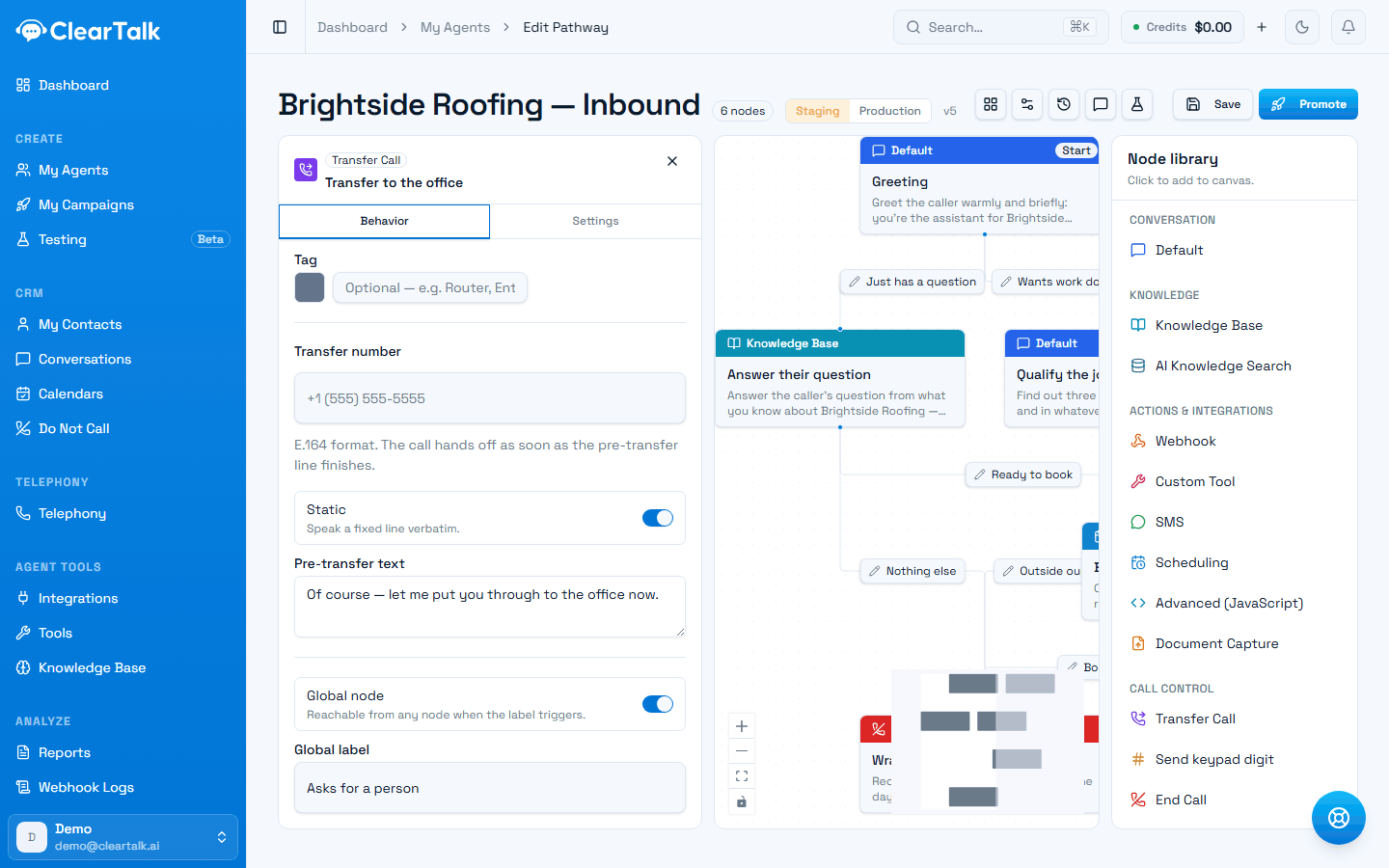
- 1One switch. The step keeps everything else it does — it just becomes reachable from anywhere.
- 2The label is when it should fire. Write it as what the caller does, not as a category.
Ask how you can help.
Which day, and a callback number.
at any point — the caller asks about pricing
Give the range, then steer back to what you were arranging.
…then back to where the conversation was
Global steps take precedence over normal branches, which is exactly what you want for an interruption but a reason to keep their labels tight.
What to make global
The test is: could a caller reasonably say this at any moment?
- Common questions — pricing, opening hours, location, parking, "do you take my insurance?"
- Conversational repair — "can you repeat that?", "you're breaking up", "slow down"
- Escalation — "I want to speak to a person." Worth making global on every pathway you build.
- Objections that recur — "is this a robot?", "how did you get my number?"
Writing a good global step
Two habits make the difference:
Write the label as the caller's intent, not your category.
Labels that fire reliably
- “the caller asks how much something costs”
- “the caller asks to speak to a person”
- “the caller says they can't hear or asks you to repeat”
Labels that fire at odd moments
- “pricing”
- “escalation”
- “audio”
Tell it to hand back. The step's prompt should answer the question and return the conversation to what it was doing — something like "answer their pricing question briefly, then steer back to what we were arranging." Without that, the agent answers and then sits there, and the caller has to restart the conversation themselves.
Keep the set small
Every global step is something the agent is constantly listening out for, and overlapping labels make it fire at the wrong moment. A handful of well-chosen global steps beats twenty. If you find yourself making most of your pathway global, that's a sign the main line needs restructuring rather than more interceptors.
The global prompt
Separately, a pathway has a global prompt in its settings: instructions applied to every step at once. It's the right home for rules that shouldn't be copy-pasted fifteen times:
- Tone and pace — "This is a phone call. Keep replies short and natural."
- Formatting for speech — "Say times in 12-hour format. Don't use exclamation marks."
- Business facts every step should know — your name, your hours.
- Blanket prohibitions — "Never quote a price. Never promise a specific person."
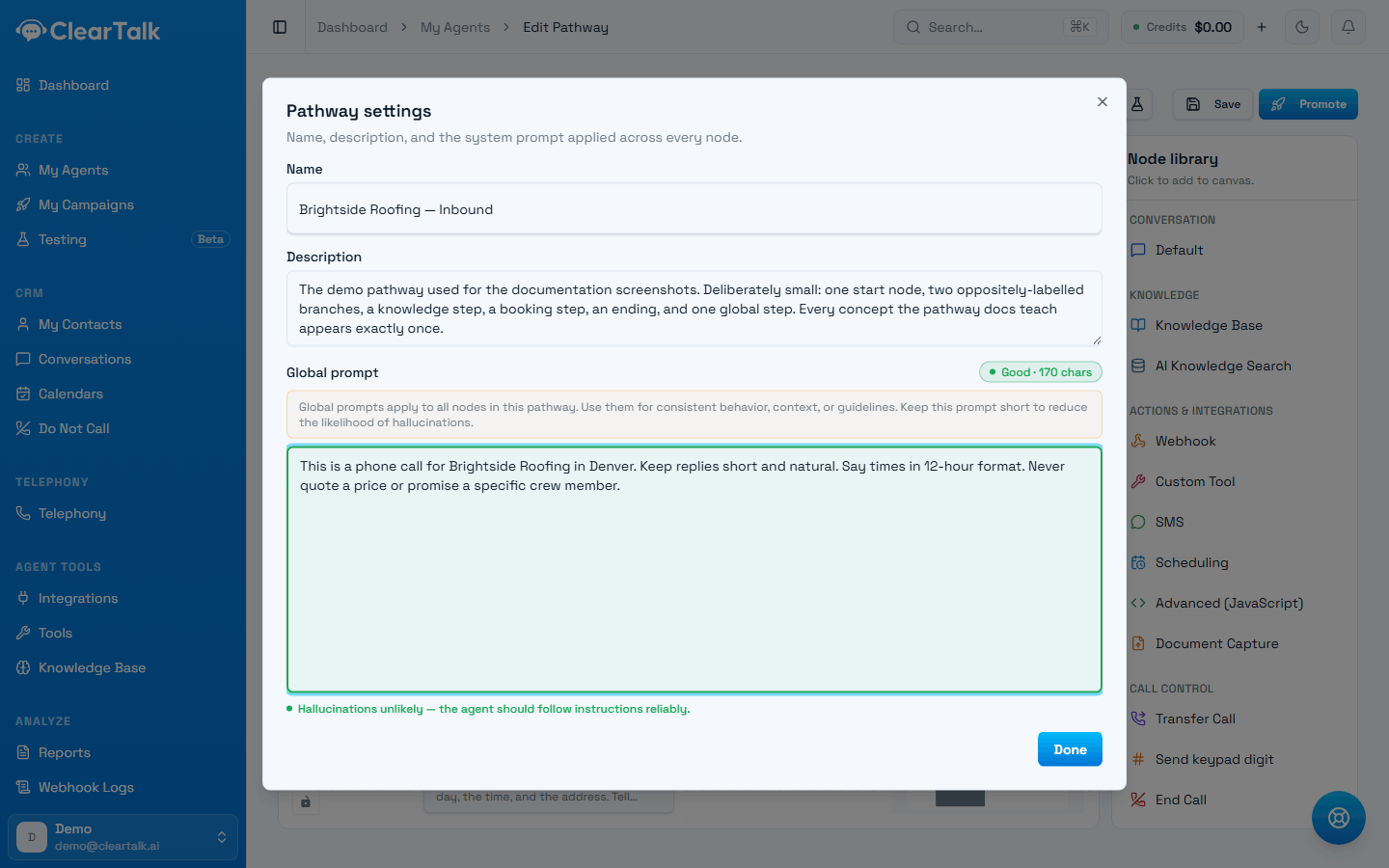
- 1The live grade. Green up to 3,000 characters, amber to 4,500, red beyond.
- 2Rules that apply everywhere. This one is only 170 characters — there's far more room than most people use.
How long is too long
The grade in the corner is the honest answer, and it's more generous than people assume:
| Length | Grade | What it means |
|---|---|---|
| Up to 3,000 characters | Good | The agent should follow instructions reliably |
| 3,000–4,500 | Warning | It may start ignoring some of them |
| Over 4,500 | Critical | Expect invented answers and ignored rules |
Three thousand characters is roughly 450 words — comfortably enough for who the agent is, what your business does, your hours and location, the rules it must never break, and how it should sound. Use that space. A global prompt written into every step is the cheapest way to make an agent consistent, and an under-written one is a far more common problem than an over-written one.
What the grade is really warning about is padding, not detail. Restating the same rule three ways, or pasting your whole website in, crowds out the instructions that matter. Everything in there should be something you'd want the agent to know at every moment of the call — anything that only matters at one point belongs in that step.
Say it once, everywhere
Anything repeated across several steps is a sign it belongs here instead. Tone, the business name, what never to say, how to speak numbers — write it once in the global prompt and delete the copies.
Which one do I want?
| You want… | Use |
|---|---|
| To answer a question that could come up anywhere | A global step |
| To let callers reach a human at any moment | A global step |
| Consistent tone across the whole conversation | The global prompt |
| A rule the agent must never break | The global prompt |
| Something that happens at one specific moment | A normal step on the main line |
The two work together: the global prompt sets how the agent behaves everywhere, and global steps handle the specific things callers do everywhere.
Where your instructions go
A pathway has six places you write instructions, and each wants a different kind of writing. The map, and the two mistakes that cost the most.
Publishing and versions
Edit safely while the live version keeps answering calls, then publish when you're ready — and roll back if you need to.