
Inside a step
Prompts versus fixed wording, loop conditions, extracting variables, teaching by example, and per-step tuning.
Most of what makes a pathway good happens inside individual steps. Open any step's settings and you'll find more than a text box — these are the controls that separate a pathway that mostly works from one you can rely on.
Prompt or exact wording
Each speaking step can either say fixed words or generate its line from a prompt.
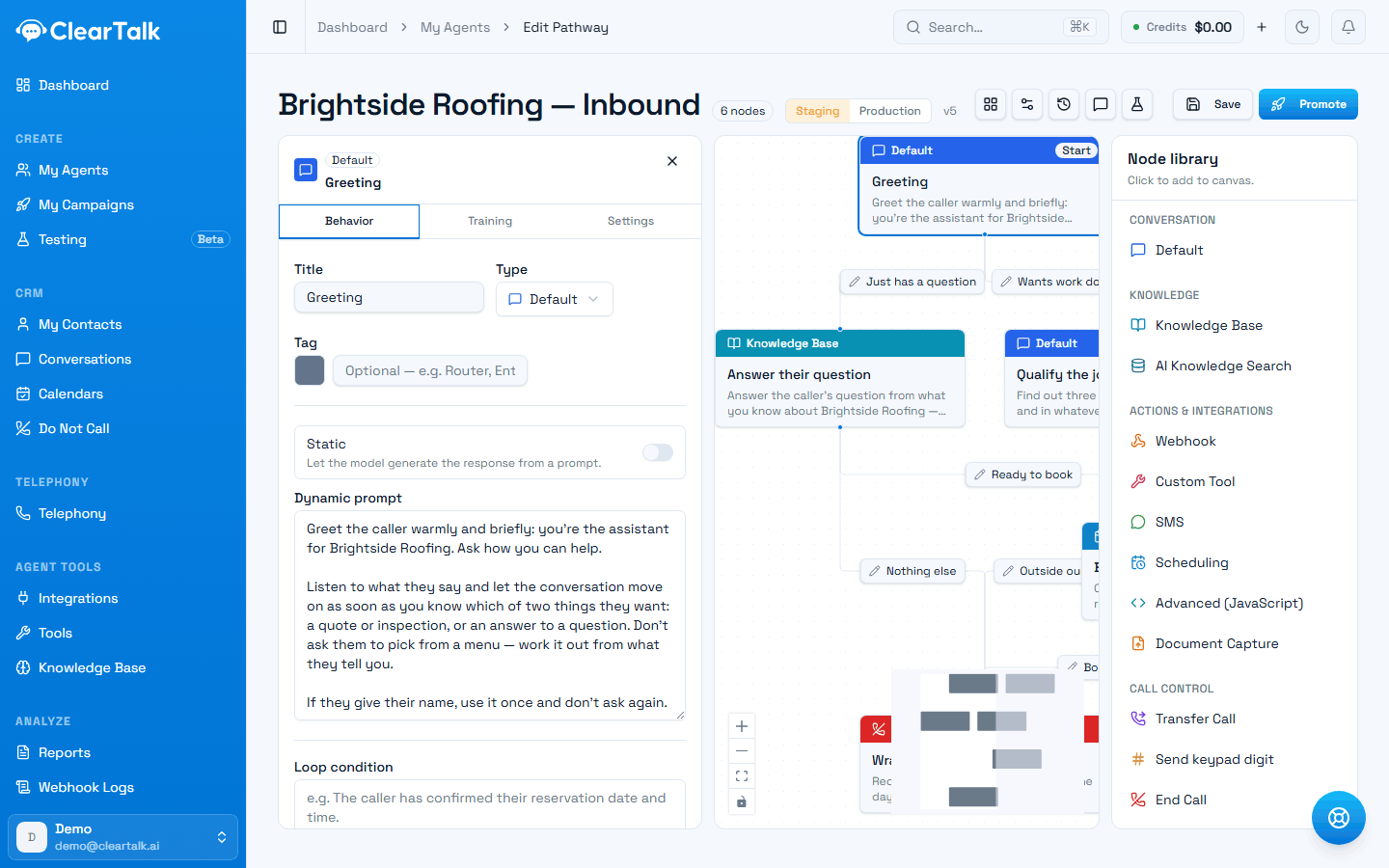
- 1Name the step for what it does — you'll be reading this map cold later.
- 2Static off: the agent generates its line from the prompt. On: it says fixed words, every call.
- 3The prompt. Instructions about what to achieve, not a script to read aloud.
Reach for a prompt by default. Describe what the step should achieve — "ask which day suits them, and mention we have Saturday availability" — and the agent phrases it naturally, differently each call, adapting to what the caller just said. Fixed wording, repeated identically on every call, is the main reason agents sound robotic.
Use fixed words where the exact phrasing matters: a regulated disclosure, a legal line, a price you cannot let the agent paraphrase, or the opening greeting where the first impression is worth pinning down.
Write prompts as instructions, not as a script to read aloud. "Confirm the address we have on file, warmly" produces better calls than a sentence the agent recites word for word on every call.
One exception to "describe, don't dictate": times, prices and phone numbers should be written out as words — "nine A M", "one hundred twenty dollars" — wherever they appear, in a prompt or in fixed wording. The voice drops digits it can't get through cleanly, and nothing rewrites this for you. See writing numbers the way you'd say them.
Before you add another step
A step can ask several things at once, in whatever order the caller raises them — that's usually better than one step per question. How many steps do you need? covers when a new step is actually earning its place.
Loop conditions: making the agent insist
Normally a step says its piece and moves on at the first sensible reply. A loop condition changes that: the agent stays on the step until the condition is met.
Loop condition: The caller has confirmed their reservation date and time.
Now, if the caller answers with a question, changes the subject, or gives half an answer, the agent keeps working the point rather than sailing on with a gap in what it knows. Leave it blank and the step advances on the first valid response.
This is the difference between a soft instruction and a hard requirement, and it's the right tool for anything you genuinely cannot proceed without:
- The caller's callback number
- Which of your three locations they mean
- Explicit confirmation before something is booked or charged
- Verification details before anything sensitive is shared
Use it deliberately. A loop condition on something the caller may simply be unable to answer will trap them in a corner — so pair strict conditions with a branch that escapes to a human.
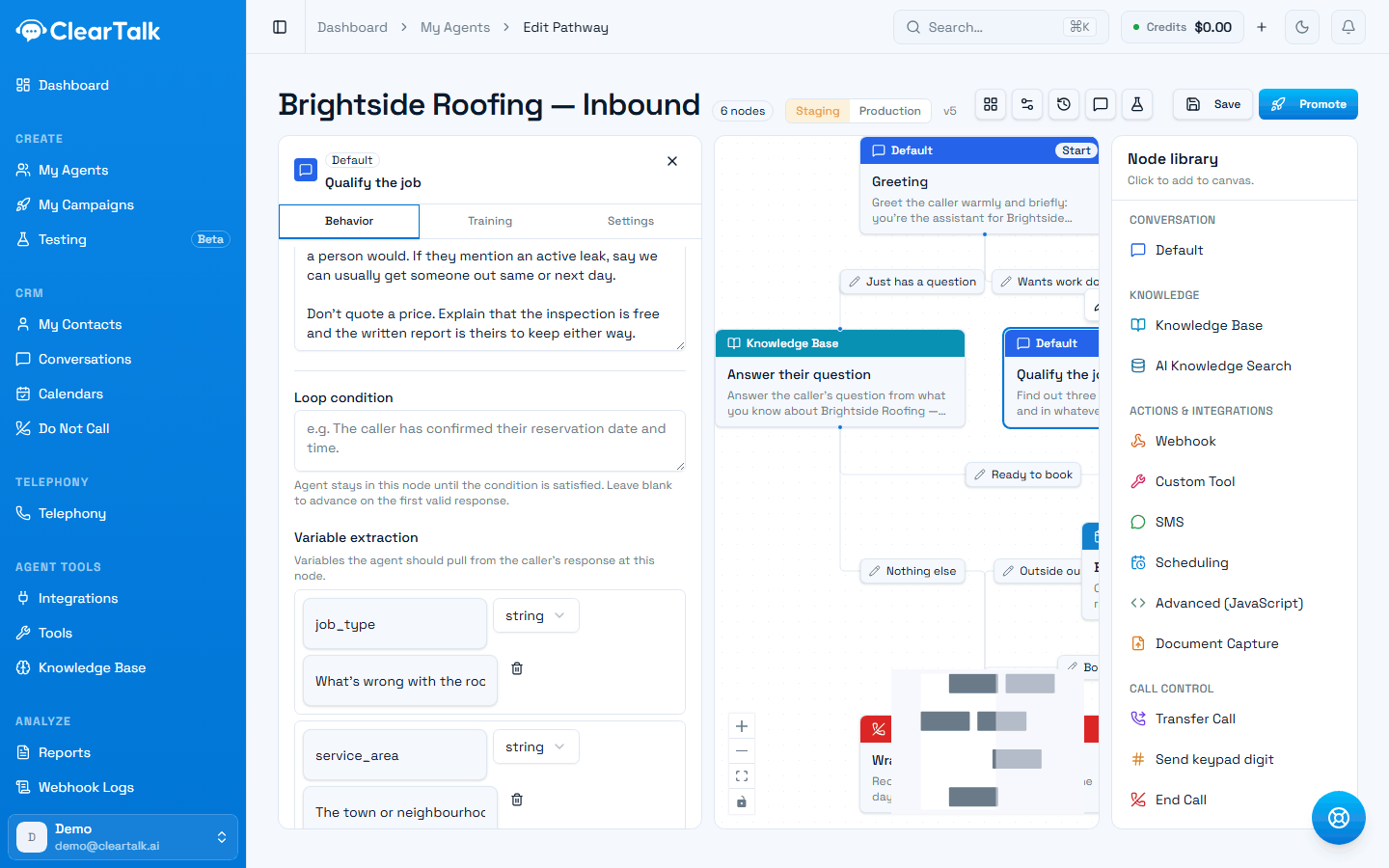
- 1The loop condition. Leave it blank and the step moves on at the first sensible reply.
- 2Each variable is a name plus a description of what counts. The description does the work.
Extracting variables
Any step can pull facts out of what the caller says and keep them. In the step's settings, add a variable with a name and a description of what to extract:
| Variable name | Description |
|---|---|
party_size | How many people the reservation is for |
preferred_date | The date the caller wants to come in |
account_number | The caller's account number, digits only |
The description is doing the work — it's how the agent knows what counts. Be specific about format when it matters.
Once captured, a variable can be used anywhere later in the conversation by writing it in double braces, like {{party_size}} — in a later step's wording, in a text message, in the body of a webhook or tool call.
Two practical notes:
- Extract where the information appears, not where you eventually need it. If the caller says their account number in the opening breath, capture it there.
- Extraction costs a moment. The agent has to read back over the conversation before it can reply, which adds a little latency to that step. Worth it for things you need; not worth sprinkling on every step "just in case".
Where variables come from
Extraction isn't the only source. By the time a step runs, variables may already exist because:
- You sent them in when the call was triggered. Anything passed as custom fields through the API or from your CRM — the caller's first name, their quote value, their appointment date — is available for the agent to use.
- A tool or webhook returned them. Values you pull out of a response become variables for everything downstream. Order matters here: extraction happens before the request goes out, so a variable captured on a step can be used in that same step's request body, and what comes back is available afterwards.
- A Document Capture step stored one — the link to the uploaded file lands in a variable you name.
Teaching by example
When a step keeps mishandling something — taking the wrong branch, misreading an ambiguous reply — you can give it examples: what a caller might say, and what the agent should do about it.
Examples live on the step's Training tab, in three kinds. Which one you want depends on what's going wrong:
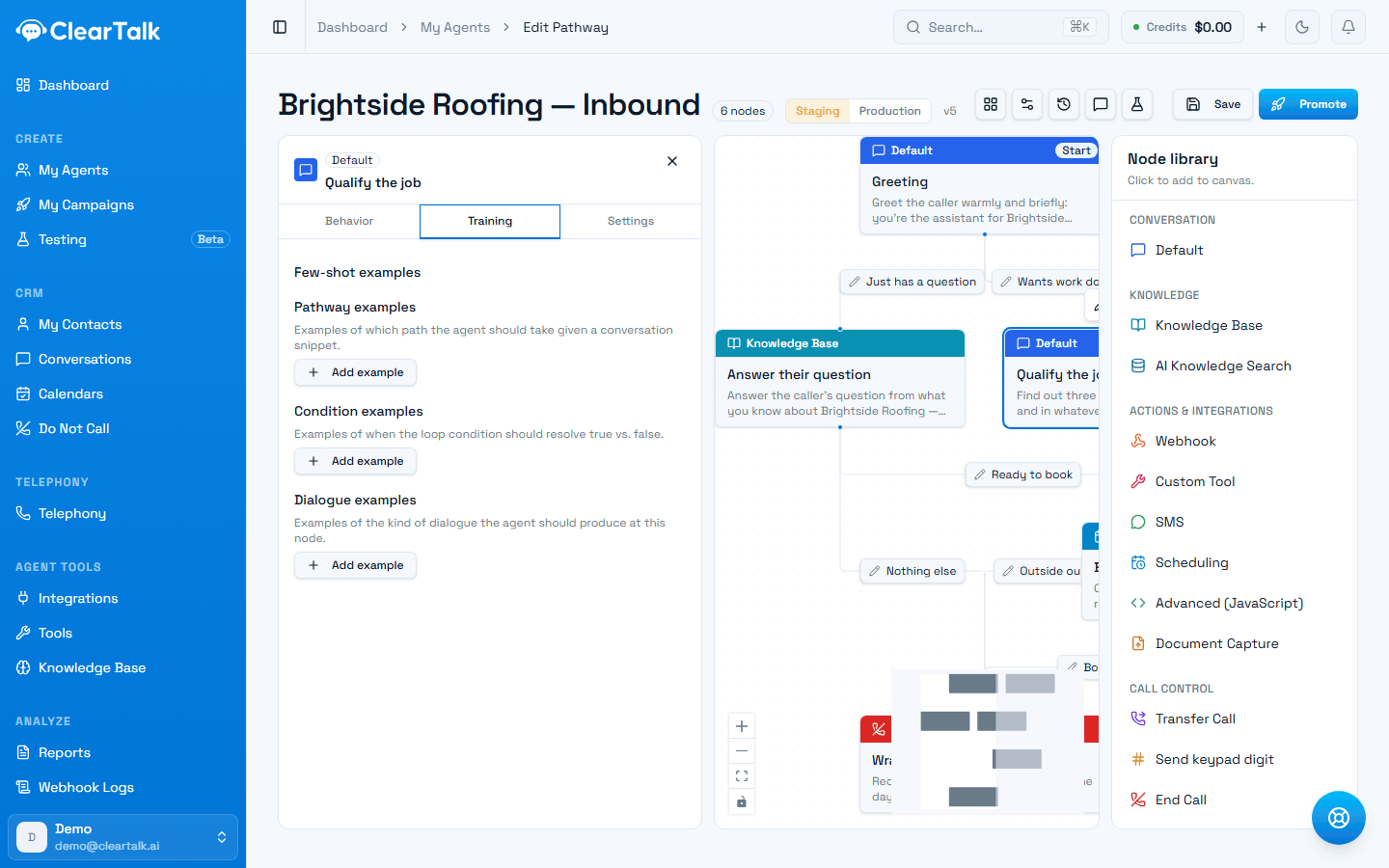
- 1Pathway examples — for a step taking the wrong branch.
- 2Condition examples — for a loop condition resolving true when it shouldn't.
- 3Dialogue examples — for a step that says the right thing the wrong way.
Example input: "I dunno, whenever you've got something"
Expected response: Offer the two earliest available times rather than asking them to pick a day.
A couple of well-chosen examples fix a stubborn step faster than rewriting the prompt for the fifth time. Use them where behaviour is actually wrong, not everywhere — they're a corrective, not a design pattern.
Per-step tuning
Individual steps can override how the agent behaves at that moment:
- Temperature — how much the wording varies. Lower for a step that must stay tight and factual; higher where warmth and variety help.
- Interruption sensitivity — how readily the agent stops talking when the caller speaks. Worth loosening on a step that delivers a necessary disclosure, and tightening where you want the agent to yield immediately.
Change these only when a specific step has a specific problem. Defaults are defaults for a reason.
The order things happen in
Within a single step, roughly: the agent works out what to say, says it, listens, extracts any variables you asked for, checks the loop condition, and only then evaluates the branches to decide where to go. Knowing that order explains most surprises — particularly why a branch that depends on a variable needs that variable extracted on the same step or earlier, never later.