
Node reference
All fifteen step types in the Pathway builder — what each does, and when to reach for it.
A pathway is built from steps ("nodes"). Most of yours will be Default steps; the rest are for the moments where something specific has to happen. They're grouped below by what they're for, not by where they sit in the library.
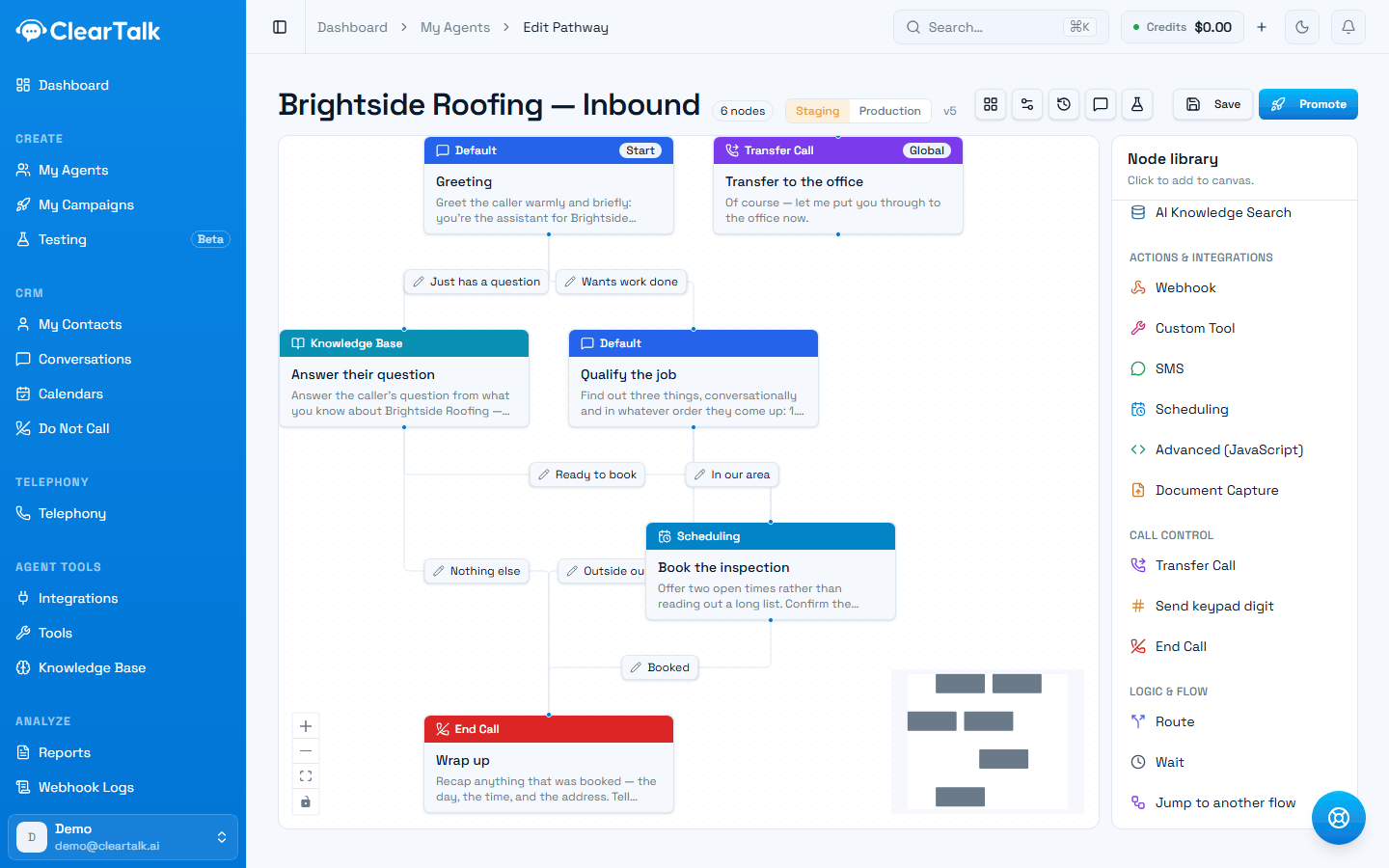
- 1Actions & integrations — the steps that do something outside the conversation.
- 2Call control — transferring, keypad tones, and ending the call.
- 3Logic & flow — routing, waiting, and handing off to another pathway.
If you're unsure which step type you need, it's almost always Default. A good pathway is mostly Default steps with a handful of specialised ones where something actually happens.
Talking
Default
The workhorse — the agent says something, listens, and moves on. You can pin the exact words, or give it a prompt and let it phrase the reply naturally in context. If you're unsure which step type you need, it's almost always this one.
End Call
Says one last thing and hangs up. Every path should reach one of these; a conversation that runs out of steps without an ending feels broken to the caller. Give each ending its own wording — the goodbye after a booking shouldn't sound like the goodbye after a "not interested".
Answering questions
Knowledge Base
Answers the caller from a knowledge base you've attached — your FAQs, price list, policies, or website content. Use it at the point in the conversation where people ask things, rather than trying to cram every fact into the agent's instructions.
AI Knowledge Search
Same purpose, different retrieval: it searches your material by meaning rather than matching a document, so it handles questions phrased in ways you didn't anticipate. Reach for it when your knowledge is large or varied.
Deciding where to go
Route
The dedicated branching step. It sends the conversation down different paths based on what the caller said or on information gathered earlier, and it takes a fallback path for anything that doesn't match. When branching is the point of a step, use Route rather than hanging many labelled lines off a Default step. See Branching.
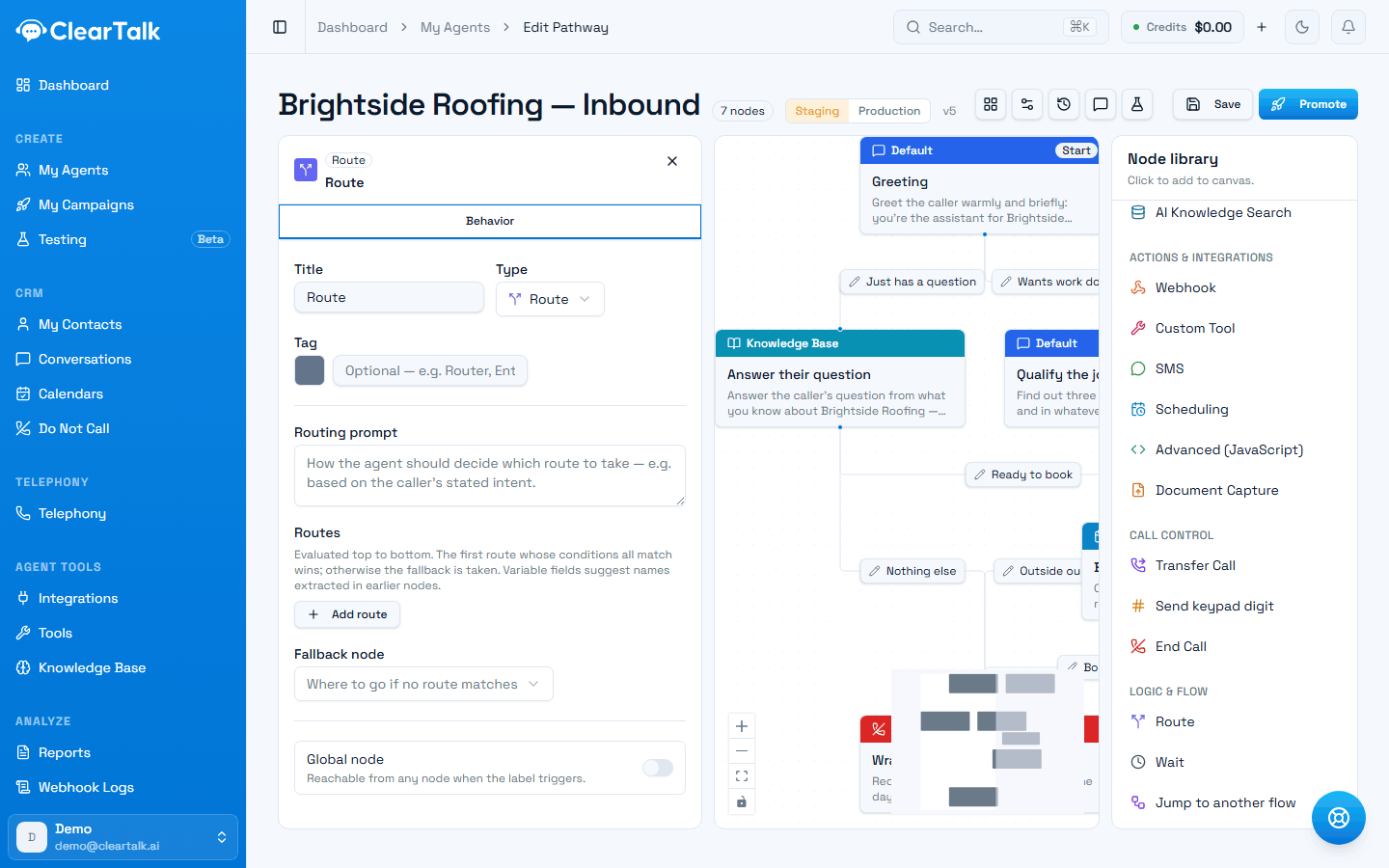
- 1How the agent should decide — usually the caller's stated intent.
- 2Routes are evaluated top to bottom. The first one whose conditions all match wins.
- 3The fallback. Set it — this is where anything that matches nothing goes.
Wait
Pauses and gives the caller room to respond before things continue. Useful after asking something that needs a moment's thought, and after a step that hands the caller off to something slow.
Jump to another flow
Hands the whole conversation to a different pathway. This is how you keep things manageable: a short front-door pathway that identifies why someone is calling, jumping into a specialised one per department or product. Shared endings — a booking sequence used by three pathways — are worth factoring out this way too.
Doing something mid-call
Custom Tool
Runs one of the tools you've built — look up an order, check availability, create a ticket, notify a team. This is the main way a pathway reaches into your own systems, and what the caller hears next can depend on what came back. See Tools.
Webhook
Calls a URL directly from inside the conversation and can branch on the response. Similar reach to a Custom Tool, but configured inline on the step rather than saved as a reusable tool. Use a tool when several pathways or agents need the same action; use a Webhook for something this one alone does.
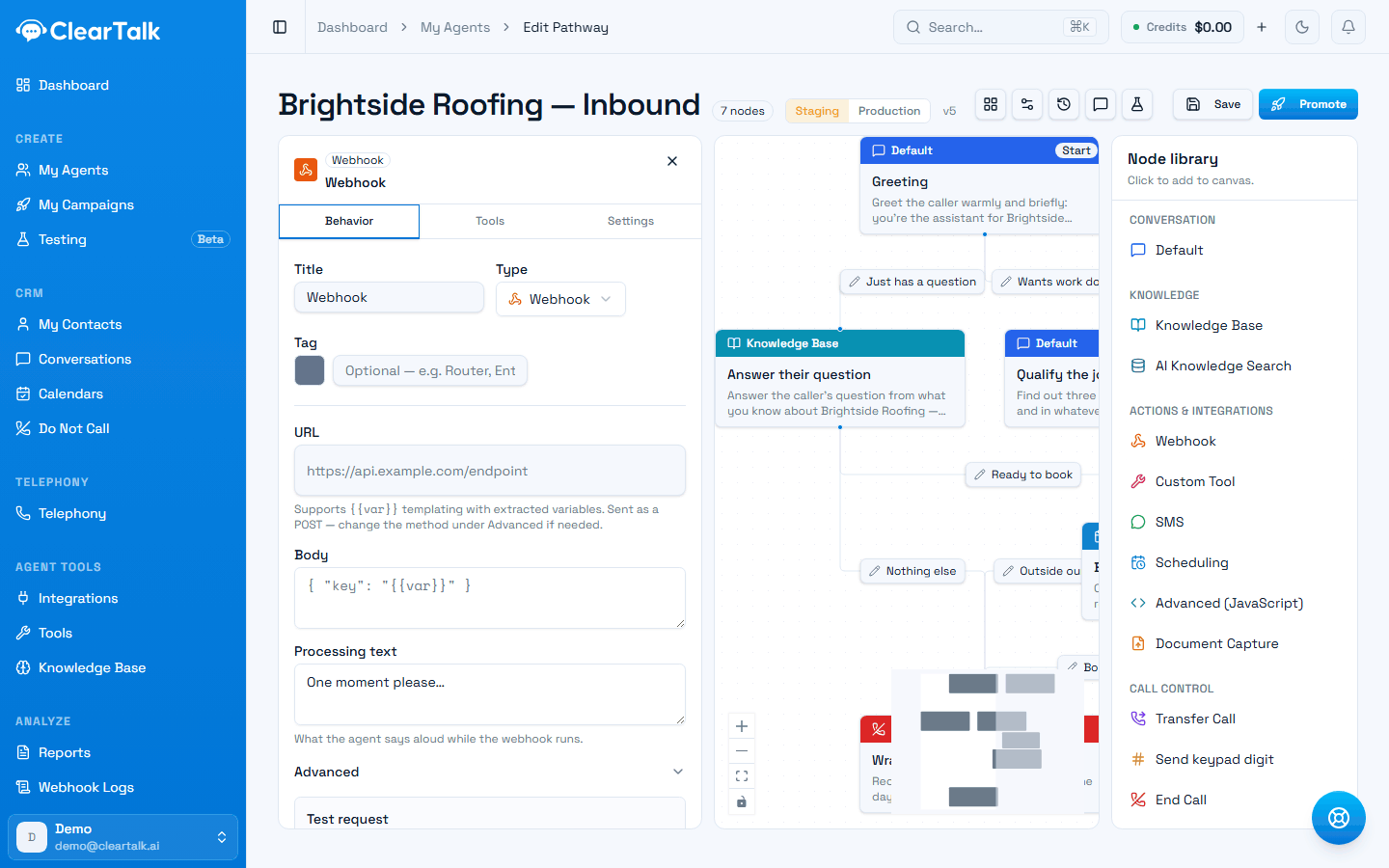
- 1The URL. Variables you captured earlier can be dropped in with double braces.
- 2The body sent with the request — variables work here too.
- 3What the agent says aloud while it waits. Without this, the caller hears silence.
Scheduling
Offers real open times inside the conversation and holds the caller there until they confirm one. It fetches those times from a URL you configure — a Get-slots URL that returns a list of available timestamps — and binds whatever the caller picks to a variable later steps can use.
This is not the same as turning an agent into an Appointment Agent
The Scheduling step calls out to a slots endpoint you provide. Booking against a ClearTalk calendar or a connected CRM calendar is a switch on the agent itself, not a step you add — see Booking in conversations. Most people want that one.
The step is also marked an Enterprise feature of the underlying voice platform, which is another reason to reach for the agent-level switch first.
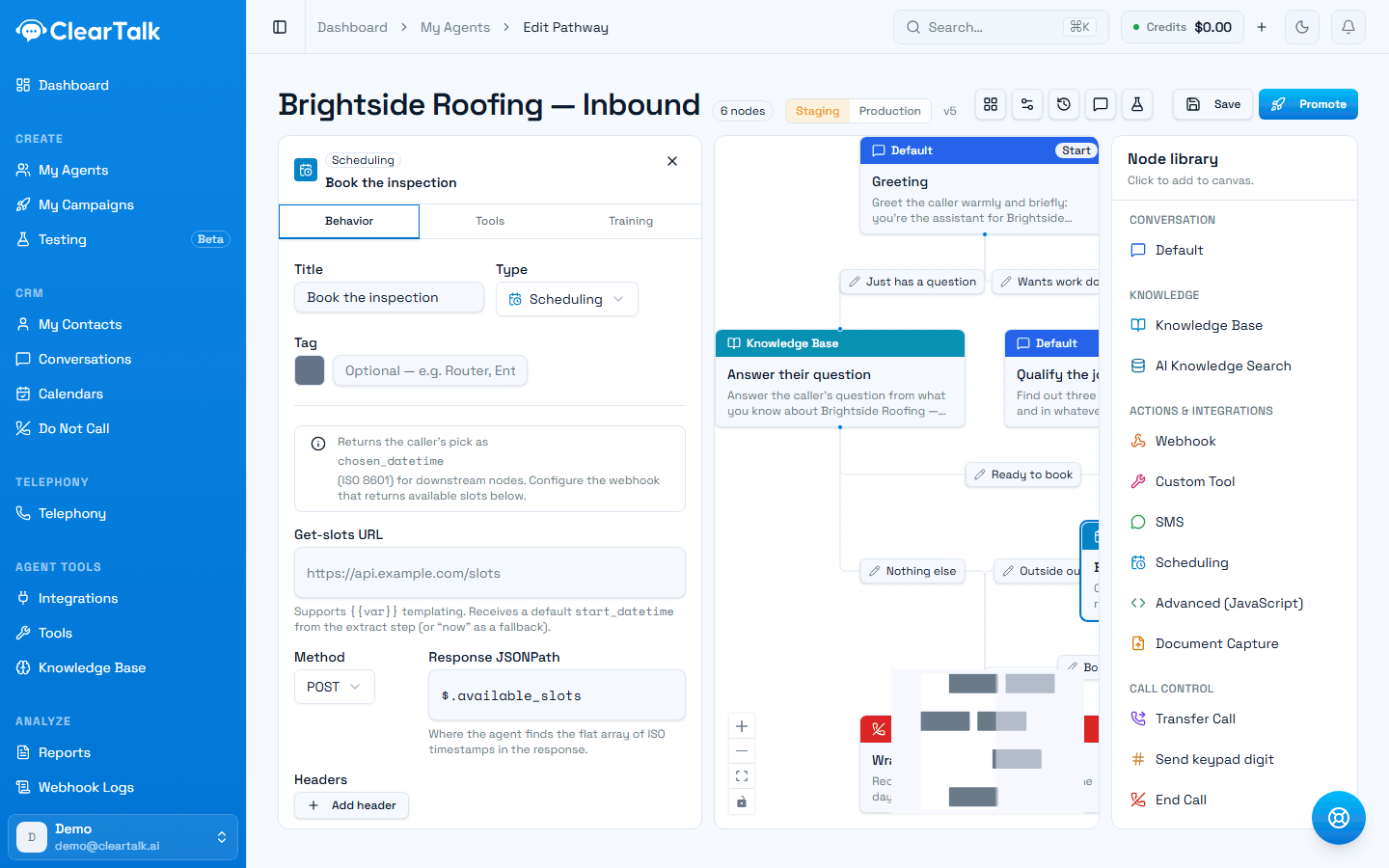
- 1The caller's pick is stored automatically for later steps to use.
- 2Where the agent asks for open times.
- 3Where in the response the list of times lives.
SMS
Sends a text message mid-call. The classic uses: texting a link the caller needs while they're still on the phone, or sending a confirmation the moment something is booked.
Document Capture
Chat conversations only. Asks the visitor to upload a file — an ID, an insurance card, a quote — and puts a link to it into a variable you name, so later steps can use it. You control the accepted file kinds, the size limit, whether it can be skipped, and who's allowed to open the link afterwards.
Send keypad digit
Presses a phone keypad tone. This is for navigating other systems' automated menus — when your agent calls a line that answers with "press 1 for…". It can send a fixed digit, work through a sequence, or let the agent choose based on what it hears.
Advanced (JavaScript)
Runs your own code for anything the other steps don't cover — reshaping data from a previous step, a calculation, a bespoke condition. Powerful, and the hardest part of a pathway for the next person to understand, so prefer a Custom Tool when a tool would do. Whatever your code returns becomes variables the later steps can read.
Like Scheduling, this step is marked an Enterprise feature of the underlying voice platform — test it on a real call before building a pathway around it.
Handing off to a person
Transfer Call
Sends the caller to a real person. A cold transfer connects them straight through; a warm transfer briefs the person first so the caller doesn't have to repeat themselves. Set up the destinations you can transfer to on the agent, then choose one here. Practical guidance on when to escalate: Transferring to a human.
Choosing between the overlapping ones
| If you want to… | Use |
|---|---|
| Answer from your own content | Knowledge Base, or AI Knowledge Search for larger material |
| Take an action other pathways also need | Custom Tool |
| Call one URL, only here | Webhook |
| Branch on what the caller said | Route |
| Split a long pathway into manageable pieces | Jump to another flow |
| Get a human involved | Transfer Call |